On Unraid
Unraid is the one install where the whole thing is a form. This page is that form, field by field: what each one wants, which ones you can leave alone, and the three that decide whether you end up with a working station or one that looks perfect and plays nothing.
If you would rather read the short version, it is three steps: install the template from Apps, fill in the four fields marked required below, and start it. Install on Unraid is the same path as numbered steps.
Before you start
Decide which tag. The template's Repository field ends in a tag, and the choice is only about what your server already runs:
| Tag | Brings | You bring |
|---|---|---|
deadair/deadair:full | a voice, PostgreSQL and Redis | nothing |
deadair/deadair:latest | a voice | PostgreSQL and Redis |
deadair/deadair:slim | the station alone | PostgreSQL, Redis and a speech server |
full is the one to pick on a server with nothing else on it, and it is what the rest of this
page assumes: it runs its own database and cache inside the container, so every database and cache
field below stays empty. Pick latest if you already run PostgreSQL somewhere you keep backups of,
which is the better home for the station's data.
Images are linux/amd64, so an arm64 server cannot run this yet.
Installing the template
Apps, search for deadair, and install it. That fills in everything the template ships with and
leaves you on the container's settings form, which is where every field below lives.
The template installs latest unless you choose otherwise. If Unraid asks which tag to install,
pick there. Otherwise change the end of Repository. For the full this page assumes, that means
changing :latest to :full. Leave it on latest with the database fields empty and the first boot
stops at deadair: no database.
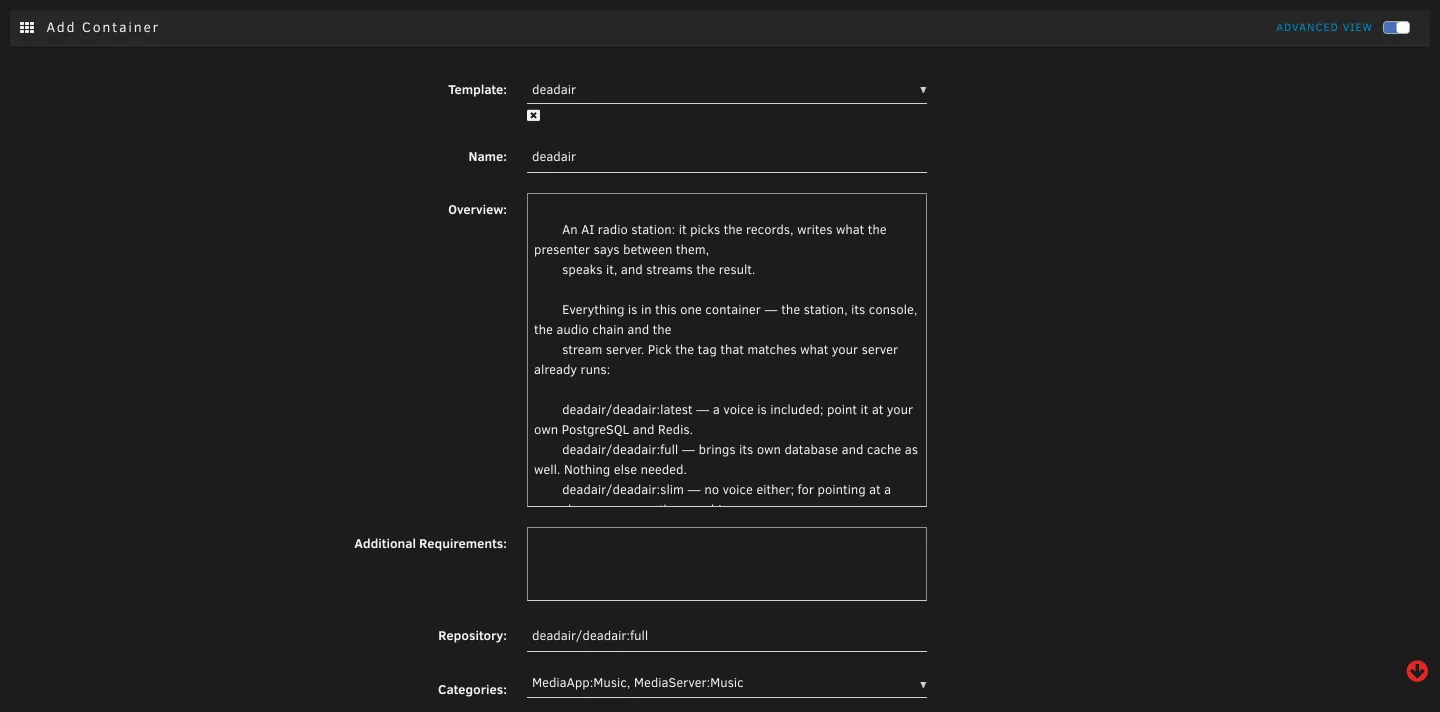 Fig. 1. The top of the form, with Repository changed to
 :full. This is where the tag is
chosen: :latest, :full or :slim.
The form has a Basic view and an Advanced view, switched at the top right. Everything required is in Basic. Advanced holds the second database role, the Redis authentication fields, the proxy settings and the migration switch, and on a normal install you never open it. Signing in through Google or another identity provider is set up in the console, under Settings → Sign-in and connections, rather than here.
The fields
The ones you have to fill in
| Field | What it is |
|---|---|
| WebUI | The port the station answers on, 8080 by default. One port carries the console, the API and the stream itself, so whatever you put in front of it carries all three. Change it only if something else on the server already has 8080. |
| Data | /mnt/user/appdata/deadair, and the default is right. This is what the station is: settings, presenters, the schedule, pronunciations, ratings, installed plugins, the stream's own credentials, your own recordings, logs, and on the full tag the database as well. Small, authored, and the thing to back up. Belongs on the cache pool. On full, prefer the pool's direct path, /mnt/cache/appdata/deadair: the database lives here, and /mnt/user goes through Unraid's FUSE layer, which PostgreSQL is slow over. Same data, so switching an existing install is stopping the container, editing this path, and starting it again. |
| Public address | The address you type into a browser to reach this station, all of it, with nothing after the port: http://192.168.1.10:8080 on your own network, or https://radio.example.com behind a proxy that terminates TLS. |
| Console address | The same address again. One port serves the console and the API, so these two always match. |
| Secret key | Leave it empty and the station makes one on its first boot, in secrets/ under Data. It encrypts every credential the station stores. Set it only to keep it off that share, and then it has to be hex: openssl rand -hex 32. |
| Session key | Leave it empty too. It signs sessions. Your own has to be RSA: openssl genpkey -algorithm RSA -pkeyopt rsa_keygen_bits:2048 | base64 -w0. |
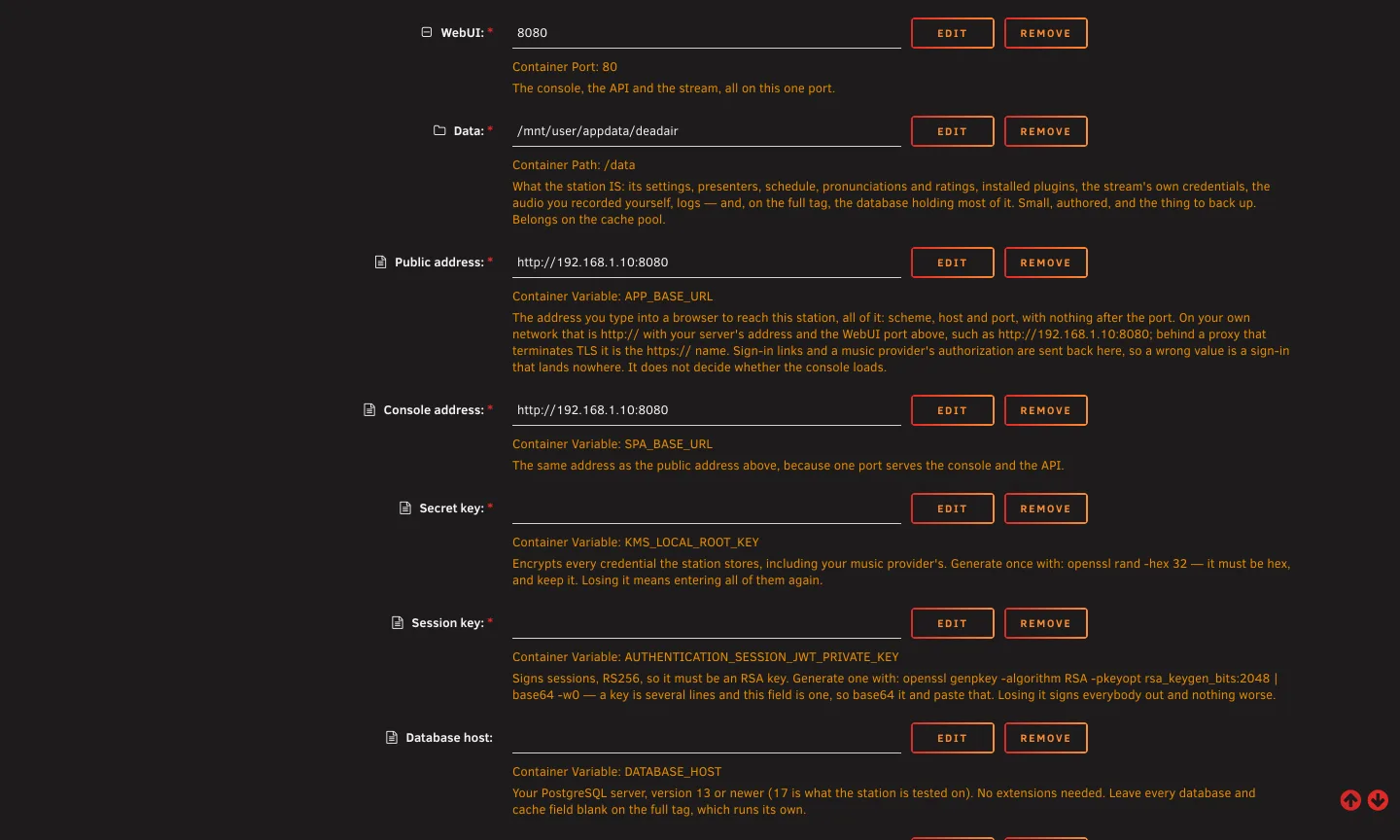 Fig. 2. The required fields, filled in for a station reached at
 http://192.168.1.10:8080, and the
two keys left empty for the station to make.
The two addresses are the field most worth getting right, and the one whose mistake is hardest to
spot. They do not decide whether the console loads: it talks to /api on whatever address it was
loaded from, so a wrong value here leaves the console working perfectly. What they address is
everywhere the station sends a browser rather than answering it, which is the link in a sign-in email
and the return from a music provider's authorization. A wrong value is a sign-in link that lands
nowhere and a Spotify authorization that never comes back.
If you reach the server more than one way, use the one you will open a sign-in link on.
The ones worth setting
| Field | What it is |
|---|---|
| Media | Optional, and only about size. What the station holds rather than what it is: records downloaded before they air, cover art, rendered speech, voice previews, the speech model's weights. All of it can be produced again by running the station, and it grows to roughly the size of the library you actually play. Point it at a share on the array and leave it out of your backups. Blank keeps it under Data, which is fine until the library gets big. |
| Timezone | An IANA zone name such as America/New_York. Left at Etc/UTC on a station that is not in UTC, the presenter says "tonight" through your afternoon. The station's own "Where the station is" setting, in the console, wins over this. |
The ones to leave empty on the full tag
Database host, port, name, user and password, and cache host and port, are all for the latest and
slim tags. On full the container runs its own PostgreSQL and Redis, and anything you type in
these is ignored.
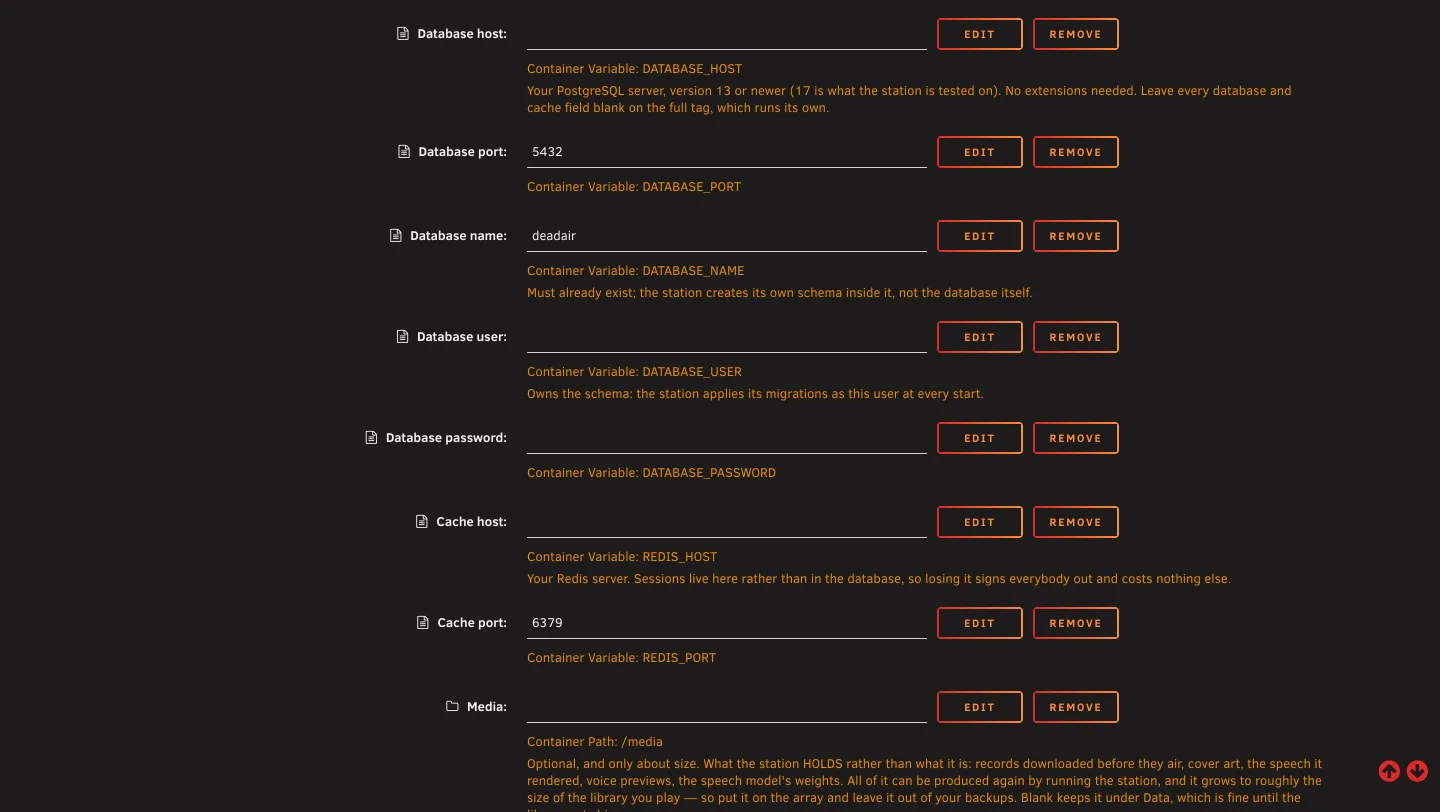 Fig. 3. On the
 full tag these stay exactly as they are. Media at the bottom is the optional
second path.
On latest, fill in the database fields and the two cache fields. Three things about the database
are worth knowing before you do:
- PostgreSQL 13 or newer, and no extensions. 17 is what the station is tested against.
- The database has to exist already. The station creates its own schema inside it, not the database itself.
- The database user owns that schema and applies the migrations at every start. It needs
CREATEROLE, or a role namedapp_usercreated beforehand by a superuser (CREATE ROLE app_user NOLOGIN), because the first migration makes one.
Advanced view, and when to open it
| Field | When |
|---|---|
| Runtime database user and password | A second, non-owner role for the request path, so a request cannot alter the schema. Both have to be filled in for either to take effect. Empty runs everything as the owner, which is what happens today. |
| Cache user, Cache password, Cache over TLS | Only if your Redis asks for authentication. Redis 6 and newer with ACLs wants a username and a password; an older one, or one with only requirepass, wants the password alone. A Redis on your own network usually wants neither. |
| Cache URL | The whole cache as one URL, which is the shape a hosted Redis hands you. Fill it in and it is the whole answer: the four fields above it are not read at all. It is also the only way to name a database index. rediss:// is TLS, redis:// is not, and anything in the password that is not a letter or digit has to be percent-encoded. |
| Proxy in front and Proxy address header | Only when a tunnel or a reverse proxy sits in front of the station. See below, because leaving it empty has a visible cost. |
| Apply migrations at start | Leave on unless you apply the schema yourself. |
If a proxy or a tunnel sits in front
Every listener then reaches the station as the proxy, so they share one rate limit and the listener
count collapses to however many different players are tuned in. That count is what holds an
audience-gated station on air, so it is worth fixing. Put the proxy's address or CIDR in Proxy in
front: 172.16.0.0/12 covers another container on the same box. Only name something you put there
yourself, because it means believing an address that arrives in a header.
X-Forwarded-For suits almost everything. A Cloudflare tunnel also sends CF-Connecting-IP.
Starting it, and the first boot
There is no ownership step. The container runs as 99:100, which is what an appdata share is already owned by.
The schema is applied before the station starts, every time, so there is no migration step to run either. Open the console on the WebUI port and create the administrator account, then, in the order that decides whether the station can be a station:
- A music provider, under Settings, Plugins. Nothing can be programmed until there are records.
- The playback authorization, if that provider is Spotify. See below, because this is the one that catches people.
- The stream's own settings: a station name, and the public address listeners reach it at.
- The presenter, under Voice, Characters.
- A model, if you want one. A station with none still talks.
- Where the station is, under Settings.
The Spotify trap
There are two authorizations on the plugin page and the station needs both. The connection lets the plugin read your library. The playback authorization, on the card below it, lets the station fetch the audio. With only the first, your playlists list perfectly and every record is dropped for want of audio.
The page Spotify sends your browser to will not load, and that is expected rather than the step failing: it is an address on the station itself, which your browser cannot reach. Copy it out of the address bar and paste it back into the console, which finishes the job.
Finding speakers
The template runs the container on Unraid's bridge network, which does not carry the multicast the Speakers plugin uses to find Chromecasts, BluOS players and UPnP renderers by itself. Add each speaker by its address in the plugin's settings instead: that works on a bridge network, and the desk's speaker menu says when the station has never found anything on its own.
Switching the container to the Host network type lets it look, but the station then listens on the server's own port 80, which is where Unraid's web interface already is, so leave it on bridge unless you have moved Unraid's interface to another port.
Upgrading, and moving
Upgrading is Unraid's own Check for Updates on the Docker page. The three tags follow main and
move on every push that changes the station; pin deadair/deadair:0.1 in the Repository field to
track releases only.
Everything the station keeps is under Data, so moving it to another server is copying that one
directory and filling in the same form. The keys the station made are in secrets/ inside it and
travel with it. A Secret key you set yourself does not, so keep that one: without it, every
credential the station stored has to be entered again.
When it will not start
Ask the container. In the Unraid web terminal, docker exec deadair deadair-doctor checks the
data share, the keys, the database, the cache and the two addresses, and says what to fix in one line
each.
Unraid's own container log is the first place to look, and the station names what it is missing rather than failing quietly:
- It exits naming a variable. That field is empty in the form.
- It cannot reach the database. On
latest, check the database exists and the user owns it. Onfull, this should not happen: leave those fields empty. - The console loads but sign-in links go nowhere. The two address fields are wrong. They are the address you type, in full.
Once it is running, the console answers most of the rest itself: Check-up says in one sentence why the station is quiet, and Help covers the usual causes.