Teach the presenter to say a name
By the end of this page the presenter says a name the way you want: a band whose letters are not its sounds, a place, a person. You will add the name, hear it in the station's voice before it airs, and go through the pronunciations the station found for itself.
How a word is said explains the table in full.
You need a station with a voice. Nothing here needs a model.
1. Add the name
- Open Voice → Pronunciations.
- In the row for a new entry, under Written, type the name as it appears in titles and scripts:
Röyksopp. - Under Said, write it the way it should sound:
royk-sop. - Press Add.
It is in Said this way now, and the station says it your way from the next break on.
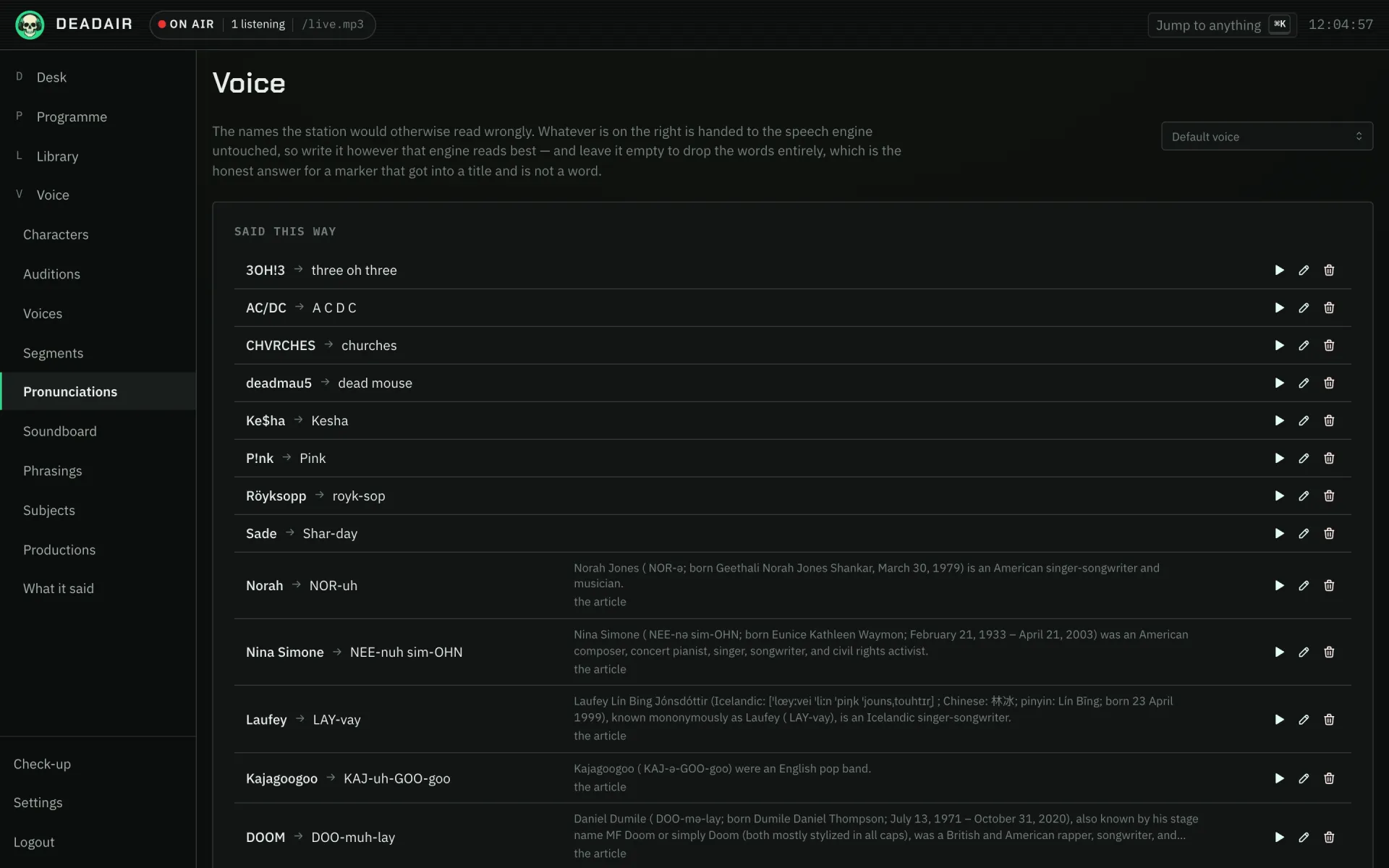 Fig. 1. Voice → Pronunciations. The rows with a sentence beside them came from the article the station found the name in.
For an artist, you can do this from their page instead. Open the artist in the Library and
press Pronunciation in the header, beside Suspend. Write the name in Say Röyksopp as,
press the play button to hear it in the default voice, and press Save. The header then reads
Said "royk-sop", with Change to edit it. It is the same entry as on Voice → Pronunciations, so
either page shows what the other saved. If the button reads Pronunciation proposed, the station
found one in an article: saving accepts it, in your words if you changed them.
Write the "said" form however your speech engine reads best. It goes to the engine untouched. Plain respelling, with hyphens between syllables, works on every engine. An engine that takes its own phoneme markup, such as Kokoro, can be given that instead.
Leave "said" empty to drop the word. That is the right answer for a marker that got into titles and is not a word at all, such as a catalogue code a provider tacks on.
2. Hear it
- Choose a voice under Voice to hear them in, or leave Default voice.
- Press the play button beside the entry.
If it is wrong, change Said, press Save and hear it again. A few tries are normal, because engines differ in how they read a respelling.
3. What it matches
An entry matches the whole word, whatever its capitals, wherever the station says it: in a break, in
a reading, in a bulletin. Röyksopp changes "Röyksopp" and "RÖYKSOPP", and leaves "Röyksopps" alone.
Longer entries win. Add Sigur Rós and Rós separately and the band's name uses the first, while
"Rós" on its own uses the second. So a name that is only wrong in one phrase can be fixed for that
phrase alone.
4. Go through what the station found
The station reads the pronunciation keys printed in the Wikipedia articles it already holds. Where it is sure which name a key belongs to, it uses it. Where it is not, it proposes one under Proposed, and does not say it until you accept it, because an article's key is often about one word of a name, and sometimes about a different name entirely.
For each one:
- Say … this way moves it to Said this way. Hear it first.
- Turn down … moves it to Turned down, where it stays, so the same article does not propose it again. Say it brings one back.
With Claude
With Claude connected and allowed to Read and manage (how), Claude can add a batch at once. It is good at respellings, and knows how many names are said:
Look at the artists the station has played this week and add pronunciations for any whose names an English speech engine is likely to get wrong. Show me the list first.
Then hear each one in the console, as in step 2.
If it goes wrong
- The station still says it the old way. A break written before you added the entry was already spoken. The next one says it your way.
- It changed a word it should not have. The written form is also an ordinary word, or part of a phrase. Make the entry longer, so it only matches the phrase you meant.
- It sounds the same whatever I write. Try splitting the respelling into syllables differently, and hear it again. Some engines do better with a respelling close to an ordinary English word.
- On a station that broadcasts in another language, the pronunciations found in English articles are not used. The ones you added still are.
Next
- Make a voice, if the trouble is the voice rather than one word.
- Read a book on air: readings use the same table, which helps with a book full of invented names.