News and weather
By the end of this page the station reads a short news bulletin at the top of every hour, written from feeds you chose, and reports the weather where it is at half past. Both come from sources you can see, so a bulletin says only what a publisher published and a weather report gives only figures a service measured.
Breaks explains bulletins and the weather in full, including what each will refuse to say.
You need a station on air with a voice, and one or more news feeds you are happy to have read out: the RSS or Atom address of a newsroom, not its front page. A model writing the breaks makes the bulletins sound like a presenter (Give the station a model); without one the station still reads the headlines as published.
1. Add the news feeds
Open Settings → Plugins and open RSS. Switch it on if it is off.
Add a row to Feeds for each newsroom:
- Address is the feed itself, such as
https://example.com/rss.xml. It is the only part needed. - Name is optional. Leave it empty and the publisher's own name is used.
- Category is optional too. Pick one if the whole feed is about one thing, such as technology.
Read the story, not just the headline is on unless you turn it off. A feed usually carries only titles and a teaser, and with this on the station opens each story's page so the presenter can say what actually happened. The stories live on other addresses than the feed, so it also needs the open web allowed: under What this plugin has asked for, press Allow beside The open web. Private and local addresses stay refused either way.
Press Save configuration. Open Library → News: the stories from your feeds are listed there, newest first. These are what a bulletin is written from.
2. Choose which feeds a bulletin reads
Open Settings → Bulletins.
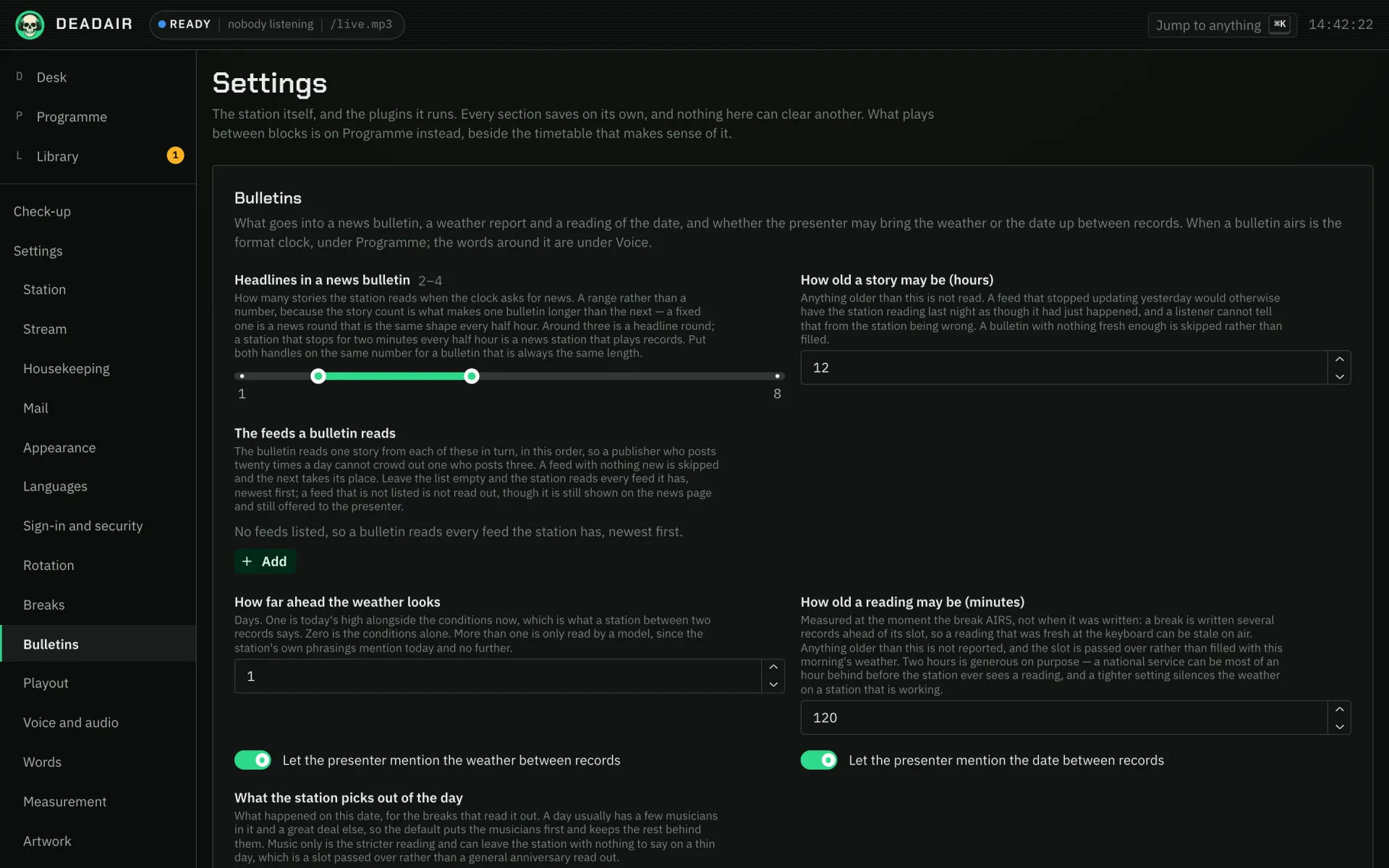 Fig. 1. Settings → Bulletins. The weather settings from step 4 are on the same page.
The feeds a bulletin reads is empty to begin with, which means every feed, newest first. That is fine with one or two feeds. With more, a newsroom that posts twenty times a day crowds out one that posts three times, so list them: press Add, pick a Feed, and repeat in the order you want them read. The bulletin then takes one story from each in turn. A feed you do not list is not read out, though it still appears on Library → News.
Two more settings here shape a bulletin:
- Headlines in a news bulletin is a range, two to four stories unless you change it.
- How old a story may be (hours) is twelve. Older stories are not read, and a bulletin with nothing fresh is skipped rather than filled.
Press Save bulletins.
3. Set up the weather
Open Settings → Plugins and open Weather. Switch it on if it is off.
For Service, Open-Meteo (no account needed) covers the world and needs no account, so start there. US National Weather Service (United States only) is free and the best forecast for a station in the United States; it asks for a Contact address, so fill that in. OpenWeatherMap needs an API key. Whose data this is says where each service's terms are published; read the one you pick. Press Save configuration.
4. Say where the station is
Open Settings → Station.
- Where the station is: a town or city, the way you would say it on air, such as
Atlanta, Georgia. Left empty, the station never mentions the weather. - Units: Celsius and km/h or Fahrenheit and mph. This is what listeners hear, whichever service answered.
Press Save station.
While you are there, check Station timezone. The format clock runs on it, so "the top of the hour" is the station's hour, not the server's.
Back under Settings → Bulletins, two weather settings are worth knowing:
- How old a reading may be (minutes) is 120. A reading that will be older than this when the break airs is not used, and the slot is passed over rather than filled with this morning's weather.
- Let the presenter mention the weather between records is off. Switch it on and the presenter may mention the weather in passing on an ordinary link, the way "it's sunny, get out there while it lasts" sounds, rather than reading a forecast. It needs a model writing the breaks. It is separate from the weather break in the next step.
5. Put them on the format clock
Open Programme → Today and find Format clock. Press Add band.
For the news:
- In New band, after Say a, write
newsas the Sort of break. - Under How often, choose every hour at and set Minutes past the hour to
0. - Save.
Then press Add band again for the weather:
- Write
weatheras the Sort of break. - Choose every hour at and set Minutes past the hour to
30. - Save.
A band waits for the record playing at its time to finish, so a bulletin at the top of the hour is read when that record ends, never on top of it.
About is optional on both. On a news band it limits the bulletin to one category, such as a
technology bulletin at half past; on a weather band it reports somewhere other than where the
station is. Both lists come from Voice → Subjects, where you can add categories and locations of
your own.
6. Let it look things up (optional)
Bulletins come from your feeds and nothing else, and no web search reaches air inside a break. What the Web search plugin adds is background: it reads sites you trust about the artists and records the station plays, so the presenter has true things to say between them, and it gives a model with tools a way to search.
Open Settings → Plugins and open Web search. Switch it on, then:
- Engine: SearXNG (self-hosted) needs no account but needs your own instance, with its JSON format switched on, at SearXNG address. Brave Search and Tavily are paid and need an API key.
- Sites worth quoting: add a row with a Name and an Address for each site you would be happy to be quoted from. Left empty, the plugin only searches. Only these sites are ever opened.
Press Save configuration.
7. Listen
When the hour comes, the record finishes and the presenter reads the bulletin: a few stories in their own words, with the facts kept, and then back to the music. At half past, the weather where the station is, in your units.
Voice → What it said lists every break the station wrote, newest first, with the ones it declined and why. Open a bulletin there to see which stories it was given.
If it goes wrong
- The band says "nothing can produce this". Nothing on the station can make that sort of break.
For
weather, the Weather plugin is off. For either, the station may have no voice to speak it. The slot is claimed and passed over, so the station plays on. - The top of the hour passed with no news. Every fresh story had already been read, so the bulletin was skipped. A bulletin never repeats a story within How old a story may be (hours). More feeds, or busier ones, give it more to say.
- A news band with an About category is always silent. No story belongs to that category. Give a feed that category on the RSS plugin, or fill in the publisher's words for it under Voice → Subjects.
- The bulletin reads the headlines and nothing else. Read the story, not just the headline is off, or the open web was not allowed for the RSS plugin. Without a model, headlines as published is what the station reads.
- Publishers' names turn up in the middle of stories. The feed points at an aggregator rather than a newsroom. Use the publisher's own feed.
- No weather at half past. Where the station is is empty, the service could not be reached, or its reading would have been older than How old a reading may be (minutes) by the time it aired. The National Weather Service may refuse requests with no Contact address, and only covers the United States.
- The presenter never mentions the weather between records. That is the default. Switch on Let the presenter mention the weather between records, and check a model is writing the breaks.
Next
- Breaks for how bulletins choose their stories, and what the weather break will not say.
- Carry a podcast to fill another slot in the hour.
- Make a show to put shows on the timetable around the bulletins.