Make a show
By the end of this page the timetable has a weekly show: a name, its hours, who hosts it, and a brief the model reads when it chooses each record. Then an hourly bulletin for the format clock, and the same show made by asking Claude.
The console has no button that drafts a whole show. The AI part is the brief: you describe the show in your own words, and the model programmes it record by record, every time it airs. The programme explains blocks, briefs and the clock in full.
You need a station with music, and for the brief to do anything, a model with Let a model choose what plays switched on under Settings → Words (Give the station a model). Without it the show still airs, with its host, on the station's ordinary rotation.
In the console
1. Open the timetable
Open Programme → Timetable. It shows the week. Click an empty hour on the day the show starts; the New slot editor opens.
2. Fill in the slot
| Field | For a late-night soul show |
|---|---|
| Name | After Hours |
| Starts at / Ends at | 22:00 and 02:00. Times are 24-hour on the station's clock, and an end before the start runs past midnight. |
| Days | Pick the nights it runs. No day chosen means every day. |
| Playing from | Leave it empty, so the station chooses records itself against the brief. Pick a playlist or chart instead to fence the show in to exactly those records. |
| Hosted by | The character who presents it. Empty means the station's own host. |
| Asked to play | The brief, in your own words: slow soul and late-night R&B, mostly 1965 to 1985, warm and unhurried, nothing with a drum machine. |
| From year / To year | Optional. 1965 and 1985 keep the model to that period. |
Save.
Write the brief the way you would brief a human DJ. Name the feel, the era, the tempo, and what to avoid. The model reads it at every pick, so "deep cuts, not the hits" works. A brief steers the model but cannot fence it in: if records outside a set must never air, give the show a playlist instead. Why.
Saving changes nothing on air now. The station moves when the slot next begins.
3. Give the hour a shape (optional)
The format clock is what the station says inside every hour, whatever show is on. It belongs to the station, so a band added here applies to every show.
- Open Programme → Today and find Format clock.
- Press Add band. In New band, after Say a, write
newsas the Sort of break. - Under How often, choose every hour at and set Minutes past the hour to
0. - Save.
A band waits for the record playing at that time to finish, so nothing is cut off.
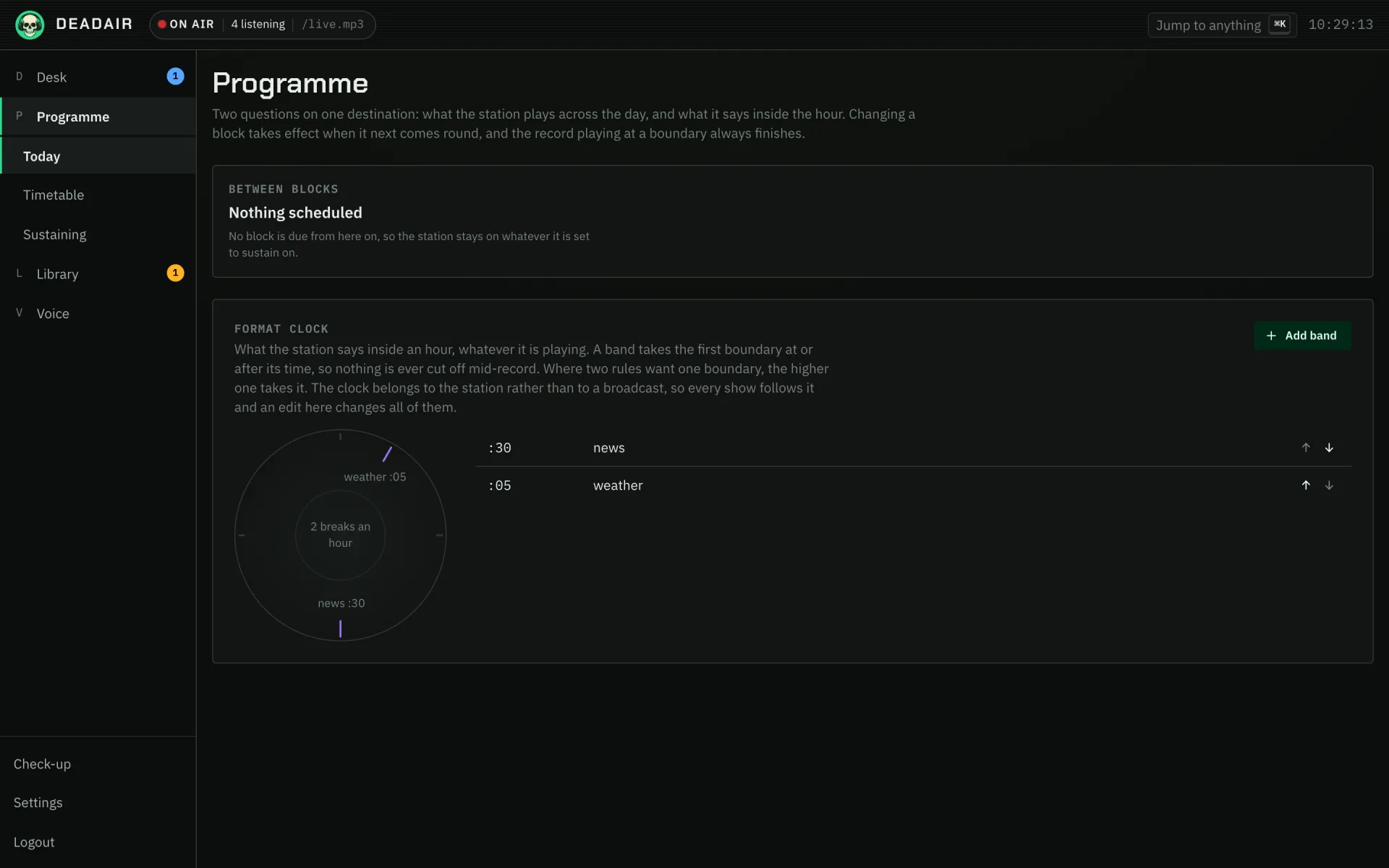 Fig. 1. Programme → Today, with the format clock below what is on now.
4. Check it
Programme → Today shows the block on air now and what is coming. When the show's hour comes, the Desk shows it on air with its host, and the running order fills with records chosen against the brief.
To hear a brief without waiting for the timetable, press Plan on the Desk, choose Start a new show, paste the brief, pick the host, and press Go on air. That improvises the show now, once; the timetable is what repeats it.
With Claude
With Claude connected and allowed to Read and manage (how), describe the show and let Claude fill in the slot:
Put a soul show called After Hours on weeknights from ten until two, hosted by the late-night host. Brief it for slow soul and late-night R&B from 1965 to 1985, warm and unhurried. Check the timetable for clashes first and show me what you will create.
Claude reads the timetable, writes the brief, and creates the block. Two blocks may not overlap, so asking it to check for clashes first saves a refusal. Claude is good at the part people find hard: turning "something for Sunday mornings" into a brief with an era, a tempo and things to avoid. Ask it to suggest three briefs and pick one.
Then check the result on Programme → Timetable, as above.
If it goes wrong
- The show plays the usual rotation, not the brief. Let a model choose what plays is off under Settings → Words.
- The slot will not save. It overlaps another block. Two blocks may not overlap; move one, or make the other a special if it is only on some dates.
- It started at the wrong time. The station's clock is Station timezone under Settings → Station, not the server's.
- The playlist show is skipped. A playlist with nothing the station may play is not aired, and the activity feed says so.
Next
- Write a character to host it, if you have not.
- The programme for guest hosts, co-hosts, specials and modes.