Let friends listen
By the end of this page a friend somewhere else can listen to your station from their phone, ask it for a record, and read the words of what is playing. You will make the station reachable from outside your home network, invite them as a listener, and they will add it to the deadair app.
People and Listening explain accounts, roles, the stream and the apps in full.
You need a station on air, and to be signed in to its console as an admin. To reach it from outside, you also need a tunnel or a reverse proxy you can put in front of it.
Listening needs no account. Anybody who can reach the station's address can play
/live.mp3 on it, in a browser or any player. An account is what adds Request and Lyrics to
the phone apps. If a friend only wants to listen, step 1 and the address are all they need.
1. Decide how they will reach it
Everything the station serves, the console, the apps' connection and the stream, goes through one port. Where your friend is decides what that port needs:
- On your own wifi. Nothing to do. They use the address you use, such as
http://192.168.1.10:8080. - Anywhere else. The port has to be reachable from the internet, through a tunnel (such as a Cloudflare tunnel) or a reverse proxy that terminates TLS. Step 2.
Before you publish an address, read the licensing notes. The stream is not password-protected, so anybody who has the address can listen, and it is your music under somebody else's licence.
2. Put it on the internet
- Point your tunnel or reverse proxy at the station's port, and give it a name, such as
https://radio.example.com. The station speaks plain HTTP; the proxy does the TLS. - Tell the station that is its address now. On Unraid, set Public address and Console
address in the container's settings to
https://radio.example.com. With Docker Compose, setAPP_BASE_URLandSPA_BASE_URLin.envto the same. - Tell it what is in front of it. On Unraid that is Proxy in front; with Compose it is
REAL_IP_FROM. Give the proxy's address or range:172.16.0.0/12covers a proxy in another container on the same machine. Without it, every listener arrives as the proxy and the station counts them all as one. - Restart the station.
- In the console, open Settings → Stream. Leave Public URL empty and it follows the address you just set; fill it in only if listeners reach the stream somewhere else. Players are told to fetch cover art from there.
Check it from a phone with wifi turned off: open https://radio.example.com/live.mp3. The first
few seconds are quiet while the station comes on air, then music. The install
guide has the detail, and On Unraid
the same for Unraid.
While you are in Settings → Stream, two more settings are worth a look for listeners on phones:
- Also publish an HLS stream keeps a phone playing when it moves from wifi to mobile data. An ordinary stream is one connection and drops at the handover; the apps play HLS when the station publishes it.
- Most listeners on each stream caps how many people can listen at once. Saving it drops everybody listening for a few seconds, so change it when nobody is.
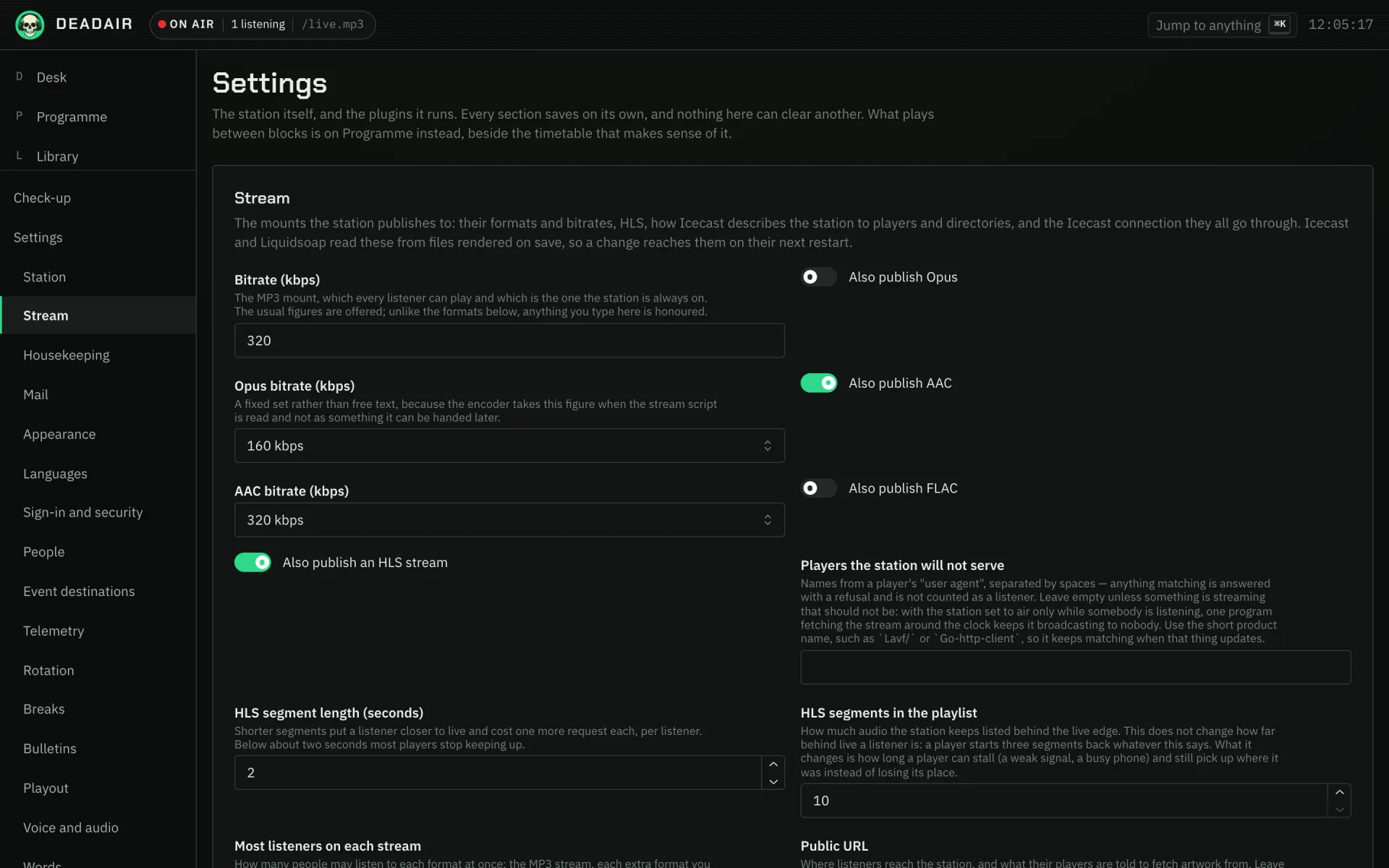 Fig. 1. Settings → Stream. Public URL and Most listeners on each stream are further down.
3. Invite them
- Open the console at its public address, not at
localhostor your network address. A link you copy from the console is made from the address it is open at. One the station emails is made from the address you set in step 2. - Open Settings → People and find Invite somebody.
- Under Their address, enter your friend's email address. Set Role to Listener.
- Turn on Email it to them if the station has a mail server under Settings → Mail. Otherwise leave it off and send the link yourself.
- Press Create invitation.
Without email, press Link beside the invitation in the list. Send the link however suits you, or let them scan the code from your screen. It works once, for that address, for a week.
If the console says it is open at an address only this machine can reach, it is: go back to step 1.
A listener can listen, ask for records and read the words. They cannot reach the desk, and if they sign in to the console they see only their own account.
4. What your friend does
- Install the app first. On Android it is on Google Play. The iPhone app is not in the App Store yet, so on an iPhone they listen in the browser, or in any player, until it is.
- Open the link on that phone and press Accept the invitation. Nothing happens until they press it, so a chat app's link preview does not use the link up.
- Choose a password and a second step. They should choose an authenticator app, because the phone apps ask for its six-digit code. A passkey works in a browser only.
- Press "Open the station in the deadair app" on the last page. The app opens with your station filled in and shows the name of the station that answered. They check it, choose to listen, and sign in from the app's settings with their email, password and code.
Leaving half way saves nothing, and the link still works.
Now playing has Request at the end of the controls, which leads to a search, an optional dedication, and what became of their recent requests. It also has Lyrics whenever the record has words, once Look up the words of each record is on under Settings → Measurement.
A friend who wants no account
Send them the stream's address, https://radio.example.com/live.mp3. For a player that wants a
playlist file, /listen.m3u or /listen.pls on the same address list every stream the station
publishes.
For somebody with the Android app, Check-up → Machinery shows a code under Listen: scanning it with a phone that has the app opens the station in it, with no typing.
5. Check it
Settings → People lists the invitation as Accepted once they have made the account, and their entry shows when they last signed in. Check-up → Machinery shows how many people are listening.
If it goes wrong
- The emailed link goes nowhere, or to
localhost. The station's address is wrong: Public address and Console address on Unraid,APP_BASE_URLandSPA_BASE_URLwith Compose. Fix it, restart, and press Send again for a new link. - The link says it has run out, or has been used. A listener's link lasts a week and works once. Send again makes a new one and stops the old one working.
- Everybody counts as one listener. The station does not know what is in front of it. Set Proxy
in front (Unraid) or
REAL_IP_FROM(Compose) and restart. - The stream cuts out on the move. Turn on Also publish an HLS stream under Settings → Stream.
- Pressing play is silent for a few seconds. That is the station coming on air for its first listener, not a fault. Why.
- The app asks for a code they do not have. They chose a passkey. They sign in to the console in a browser with it, open Sign-in and security, and add an authenticator app.
- They lost their phone. Open their entry under Settings → People and press Reset second step. They sign in with their password and set up a new one.
Next
- Throw a party, for guests in the same room who want no account at all.
- Put the station on a chat platform, so friends can ask for records from Telegram, Discord or Slack.
- People for wording the invitation email and looking after accounts.