Keep records off the air
By the end of this page the station never plays what you do not want it to: one record, everything by one artist, a whole genre, live recordings, or anything explicit. Each of these is absolute. No playlist, chart, album or listener's request gets round it.
The programme explains the rules in full.
You need a station on air with music. Nothing here needs a model.
There are three tools, from the narrowest to the widest:
| To keep off the air | Use |
|---|---|
| One record, one album, or everything by one artist | A dislike |
| A whole kind of record: a genre, a tag, live recordings | A never-play rule |
| Explicit records | The explicit-content setting |
1. Dislike what you never want to hear
A dislike is the quickest: press it while the record is on.
- On the Desk, in the running order, set the record's rating to Never play.
- In the Library, open a record, an album or an artist and do the same. Disliking an artist keeps every record of theirs off the air, including the ones they only guest on.
- From your phone, signed in as the operator, use the record's rating on Now playing (Run the station from your phone).
A dislike takes effect at once. Records already planned come out of the running order straight away, rather than waiting for it to be rebuilt.
A dislike always wins. Like a song by an artist you disliked and it still does not play. To undo one, set the rating back to No opinion.
2. Refuse a whole kind of record
For "no Christmas music", "no rap in the mornings" or "no live versions", dislikes are too narrow. Use a never-play rule.
- Open Programme → Leans and rules and find Never play.
- Choose what the rule refuses:
- Genre refuses that genre and any kind of it. A rule for
Punkalso refuses Punk Rock. A rule forRapdoes not refuse Trap. - Tag refuses a record carrying exactly that tag.
- Version: Live recordings refuses a record whose title or album says it is live, such as "War Pigs - Live" or anything from "Live in Nottingham". "Live Wire" still plays.
- Genre refuses that genre and any kind of it. A rule for
- Leave the limits empty for a rule that always holds. Or limit it:
- From (MM-DD) and To (MM-DD) for a season.
12-01to01-06runs over the new year. - From hour and Until hour for a window of the day.
22to6runs over midnight. - Only in these modes, or Only during these blocks, to hold it only for some shows.
- From (MM-DD) and To (MM-DD) for a season.
- Press Add rule.
The rule applies from the next record the station chooses. Records already queued stay.
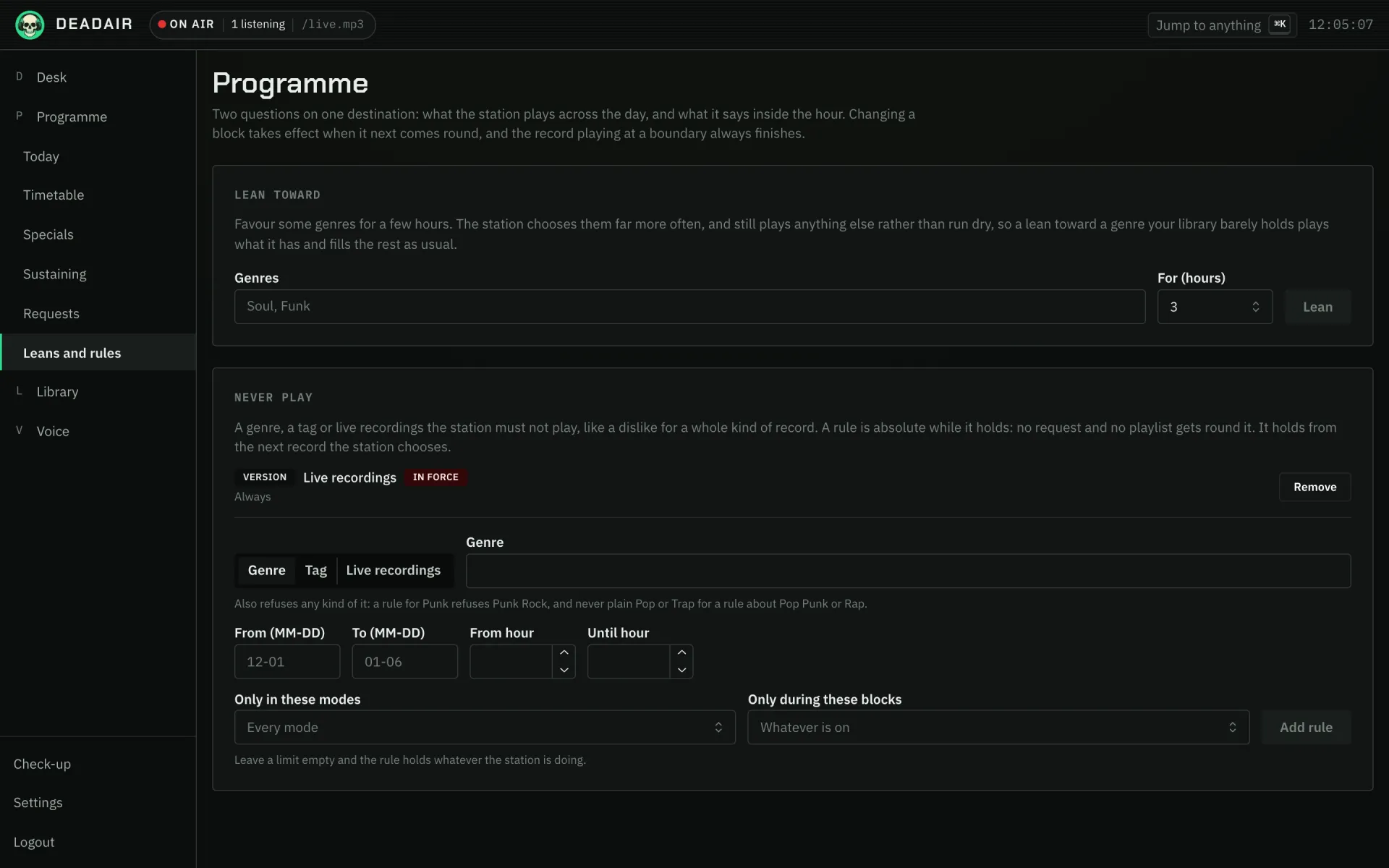 Fig. 1. Programme → Leans and rules, with one rule already in force: no live recordings.
A record nobody tagged is never refused by a rule. A rule matches the genres and tags the station holds for a record, so it is only as good as those. A record that slips through can still be disliked.
A worked example: Christmas, but only in December
Add a Never play rule for the genre Christmas, from 12-27 to 11-30. It holds for most of
the year, running over the new year, and lifts for December. Leans and rules shows it as Not
now while it is lifted.
Pair it with a special in December if you want a Christmas show as well. A special's playlist cannot get round a rule that is holding, so keep the special inside the weeks the rule is lifted.
3. Keep it clean
- Open Settings → Rotation and find Explicit content.
- Choose:
- Play the original version, the default.
- Prefer a clean version where there is one. It leans toward the clean copy, and still plays the original when that is all there is.
- Only play records marked clean. Strict.
- Save.
"Only play records marked clean" can empty the station. Explicit or clean is a label your music provider puts on a copy, and most providers mark nothing. On their libraries the strict setting plays nothing, and the activity feed says so. Try Prefer a clean version first.
Either of the last two also keeps the presenter's own words clean, even for a character given extra room.
4. Check it
Programme → Leans and rules lists every rule with In force or Not now, so a seasonal rule shows whether it is holding today. The Library shows each record's, album's and artist's rating.
When a rule or a dislike refuses something you put on yourself, such as a playlist, the record is left out and the rest plays in order.
If it goes wrong
- A record I disliked played anyway. It may be a different recording of the song, such as a remaster or a live version, which the library holds as a record of its own. Dislike that one too, or the artist.
- A rule did not stop a record. The record carries no genre the rule matches. Open it in the Library to see its genres, and dislike it if it has none.
- Nothing plays with "Only play records marked clean". Your provider does not mark records. Use Prefer a clean version where there is one.
Next
- Make a show, for steering what plays rather than refusing it. A brief steers a model but cannot fence it in; a rule can.
- The programme for Lean toward, the gentle opposite of a rule.