The programme
The programme answers two questions: what the station plays across the day, and what it says inside the hour. The first is the timetable and the second the format clock. Underneath both sit rules about which records may air at all, and they hold however a record was chosen.
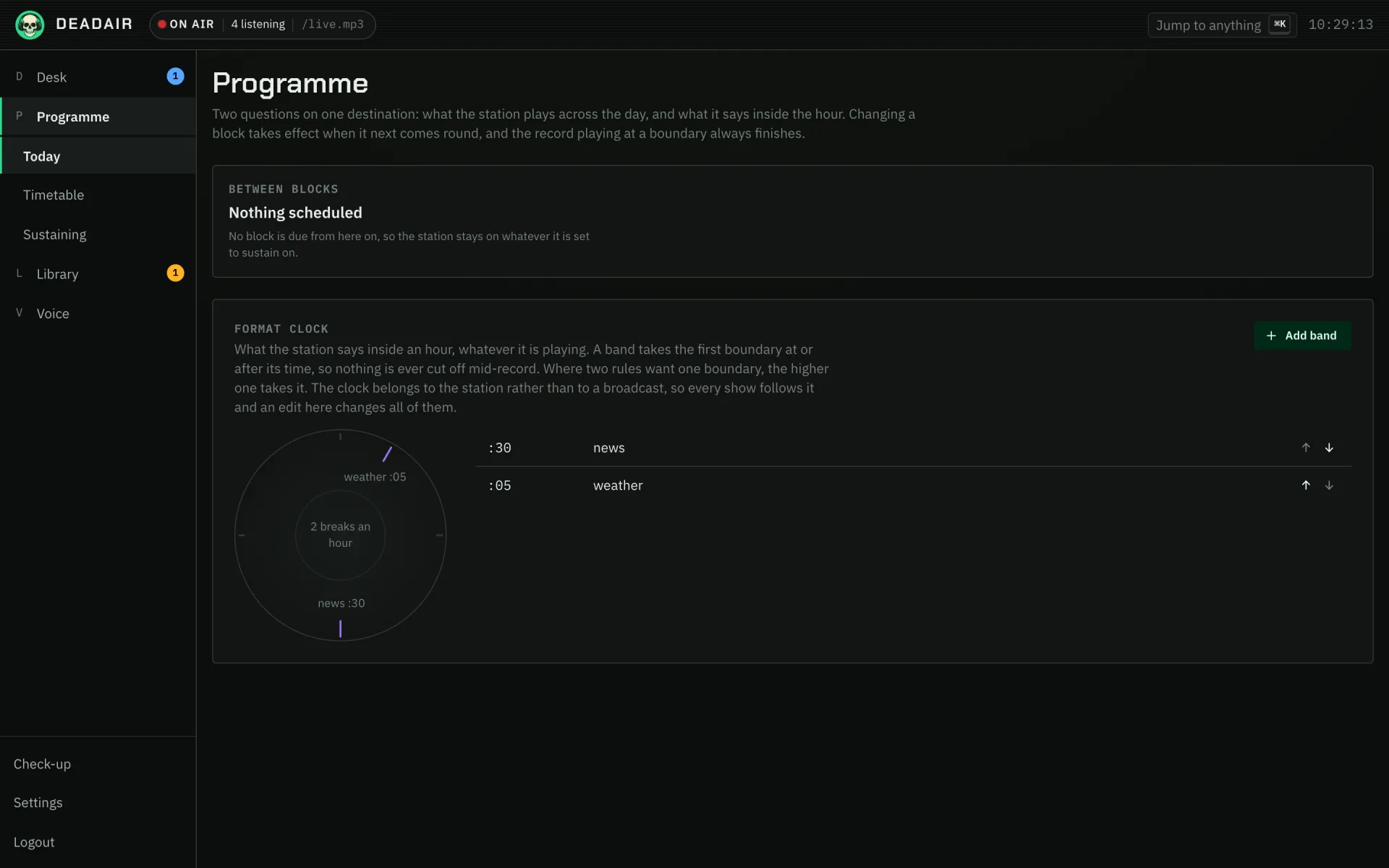 Fig. 1. Today: the block on air, and the shape of the hour.
The timetable
A block is a named stretch of time on chosen days: breakfast, weekdays, six until ten. It says what to play (a playlist from a provider, one of the station's own playlists, a chart, or nothing, leaving the station to fill it), who hosts it, a brief in your own words, an optional period, a mood to lean toward, a mode, and what happens when it runs out. A block playing a playlist can also mix similar records in among it, the way Air with similar records mixed in does from the library. Two blocks may not overlap.
To keep a block to a pool of records (no classical during the rock hours, say), make the pool a playlist and give the block that playlist. The brief steers a model and cannot fence one in, but a playlist is a list of records and nothing else airs from it. For a long pool, import it as one of the station's own playlists and choose that. A provider's playlist is read from the provider at the moment the block starts, and a playlist of thousands of records is slow to read. The station's own playlists are read from its library and start on time however long they are.
A block plays its playlist in the playlist's own order, from the top, every time it opens. For a playlist longer than the block, switch on Pick the playlist up where it left off: each time the block opens it starts with the record after the last one from the playlist that aired, so a long playlist gets all the way through over several nights instead of playing its first hour every time. An operator taking over in the middle of the block no longer starts it over either. The editor shows the record it will open on next, and Start from the top sends it back to the beginning. A record taken off the playlist, or one the station will no longer play, starts it from the top; so does choosing a different playlist for the block.
If a block's playlist cannot be read when the block starts (the provider timed out, its plugin is switched off, or the playlist was deleted), the block starts anyway: the station chooses records from the block's brief, period and host, and the activity feed says the playlist could not be read. A playlist that was read but has nothing the station may play is different. The block is not aired, the feed says so, and whatever is on carries on.
A schedule need not cover the day. The hours no block claims play the sustaining source: a playlist or a chart, or a brief and a period, with no times attached.
The running order makes each changeover at a record boundary, so by default the record playing when a block starts is left to finish, however long it is: a seventeen-minute record at the top of the hour starts the new show at seventeen past. Start shows on time (off by default) sets a limit. A record from the programme that ended that is still playing five minutes into the new block (or however many you choose; zero ends it at once) is faded out over four seconds (or however long you choose; zero cuts it the way Skip does), and the activity feed names the record and the show it was holding up. Only the schedule's own changeovers are affected: a programme you put on by hand always lets the record finish.
If you put something on yourself inside a block, yours holds until the next block begins, and the Desk offers to keep it on longer.
Saving a block changes nothing on air: the station takes the change the next time the block comes round. To change the show you are listening to as well, open the block that is on air and press Save and apply now. The show carries on rather than starting again. Its name, brief, period, moods, rules and host change in place, and when the change affects which records are chosen, the records still to come are chosen again while the ones already planned keep playing, so the station never goes quiet for it. A different source, mode, ending or set of co-hosts cannot change in the middle of a show; the station tells you so, and those take over the next time the block comes round.
A block set to stop when it runs out goes quiet for the rest of its hours, and the next block still starts on time. Pressing Stop yourself is different: the schedule leaves a station you stopped off until you put it back on.
At each changeover the station says so between the two shows, with the new host thanking the last one. See When the show changes.
Guest hosts
A block can have guest hosts who sit in for its own host on some nights. A guest comes on fixed nights (Wednesdays, say), or at random: about one night in however many you choose, with a gap between visits (half of that by default, so an about-weekly guest never lands two nights running). Random nights are worked out from the date, so nobody can predict them, but the station and the console always agree on who is on tonight. On a guest's night the station puts them on, and they know whose show they are sitting in on, so they can say so. Only a host can sit in. Today shows "sitting in for" on the block that is on; nights still to come are not given away.
Co-hosts
A block can have co-hosts who present beside its host: every night, on fixed nights, or as a visitor who turns up at random (about one night in however many you choose, with a gap between visits). Up to three are on any one night. On a show with co-hosts the talk breaks go round them, each said by whoever was heard from least recently, and every presenter knows who else is on. Every half hour or so the presenters trade lines for a few minutes in a banter, with no format clock rule needed. Today names tonight's co-hosts beside the host once their night is on.
Specials
A special is a block on dates rather than every week: Halloween night, the week before Christmas, an evening somebody else presents. It has everything a block has, plus a first and a last date, and it can repeat every year on the same dates (a yearly range may run past New Year). Inside its dates it still runs only on the days you tick, so "the Fridays in December" is a range and a day. On its dates a special takes over from the weekly schedule for its hours, and whatever usually airs then resumes when it ends, part-way through if it was still on. Two specials may not overlap each other.
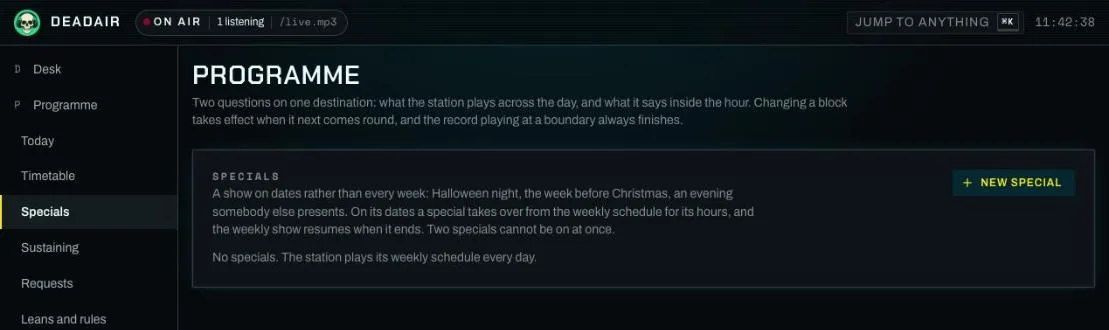 Fig. 2. Specials.
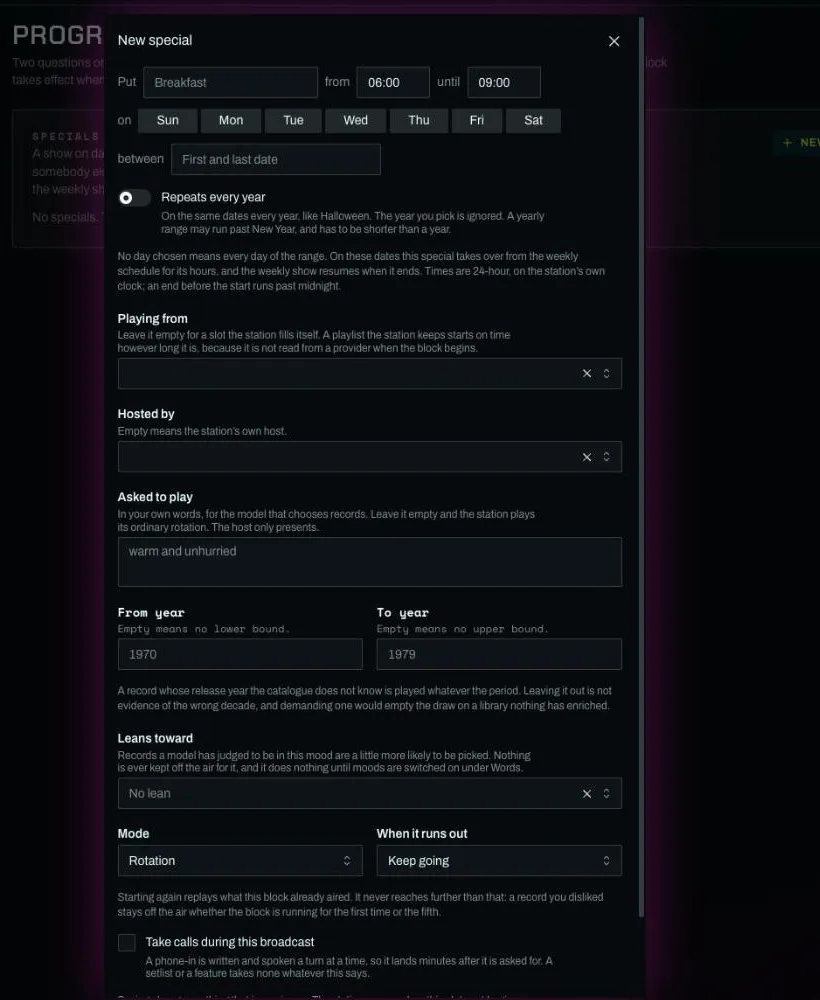 Fig. 3. A new special.
Modes
A rotation is the station programming for itself: by default a record does not repeat within three days, an artist rests for 40 minutes after airing, and a batch holds at most two records by one artist. A setlist (a sequence somebody made) and a feature (one artist, or an album in full) start with those rules off, since a Christmas setlist exists to repeat, and with no breaks, phone-ins or blending, since somebody chose those gaps. A setlist can have a host anyway: tick Host talks between records and the host talks and the jingles play as often as the station's settings say, while the records still play exactly in order with nothing cut or added. That is what a chart countdown is. Only a rotation keeps going when it runs out; the others stop.
A rotation block, or a show you start from Desk → Plan, can set its own Repeat rules: Record rest (days), Artist rest (minutes) and Most per artist in each batch. An empty box keeps the station's setting and 0 turns that rule off for as long as the block runs. An hour of one artist needs two of them: set Artist rest to 0, or the second record by that artist is refused for 40 minutes, and raise Most per artist, or each batch holds two. A record you disliked, or one a Never play rule keeps off, stays off whatever these say.
A block that talks (any block but a feature), or a show started from Desk → Plan, can also say Who writes the breaks first: the model with the phrasings underneath, or the phrasings with the model underneath. The station's setting follows Settings, Words. See Breaks.
A chart played inside a scheduled block is cut to fit the time the block has left, keeping the top of the chart, so a countdown ends on number one. Number one may start just before the block ends and finish a few minutes into the next show, up to Let a record run into the next show for (minutes).
How a pick is made
When the order needs records, sources are asked in turn, each only for what is still missing:
- A model, if you let one choose. Off by default. With smart shuffle on, its search results say how many days ago each record aired, so it can prefer one it has not played lately.
- A published chart, for the share of each batch you give it. None by default, so installing a chart plugin changes nothing.
- Artists similar to what recently aired, up to 40% of each batch, where a similarity plugin — Deezer, which needs no account, or Last.fm — knows who resembles whom. With smart shuffle on, each similar artist contributes a record that has not aired lately where it has one, rather than always its best known.
- A weighted draw from your library, shaped by the rotation rules and your ratings. With smart shuffle on, which is the default, it also leans away from what aired lately: a record that has just played keeps a quarter of its usual chance and warms back up over a fortnight, so the station works through more of your library before it repeats itself. It is a lean and never a rule, so a small library still plays everything.
The last cannot fail, so an hour is always filled, and a partial answer from the model is kept rather than thrown away.
Three more leans shape the draw from your library, all on by default and all under Settings, Rotation. Bring back artists you like draws an artist you have liked half again as often once they have not aired for three weeks (Days before a liked artist counts as quiet), until they come back round. Play deep cuts draws half again as often a record from an album you like, or with another record on it you like, that has not aired in the 120 days of history the station keeps, and the presenter can mention that it is an album track. Play what you skip less often gives a record you cut short with Skip a quarter of its usual chance, recovering evenly over a fortnight (Days a skipped record takes to recover). Only your own Skip counts, from the console, an assistant or a chat command; a record cut because you disliked it, or at a change of programme, does not. All three read your ratings and your skips, never how often a record has played, and like smart shuffle each is a lean and never a refusal: a dislike is how to keep a record off the air.
A pick the library has never seen is looked up at your providers and taken into the catalogue, unless you turn off Play records the station does not own yet. The match is strict on title and lead artist, because a near miss does not fail: it airs the wrong record while the console names the right one.
The brief and the period
A brief is what you asked for in your own words: "heavy metal hits". Only a model can read words, so the library draw cannot act on one, and by default it fills what the model could not. An hour briefed "flamenco guitar" can therefore end in whatever else you own. Turn on A brief is binding and those slots stay empty instead, and the hour runs short.
A period is a range of years. It is numbers rather than words, so every source honours it, the draw included. A record whose year is unknown plays whatever the period. A record is dated by the earlier of its own year and its album's, because providers often date a track by its reissue.
A block can also lean toward a mood (love, happiness, comfort, sadness, loneliness, anger or fear) under Leans toward in its editor. The moods come from a model, which reads each record's lyrics and, where the station can search the web, what is written about it, once Let a model judge what mood each record is in is on under Settings, Words. It is off by default, runs in the background behind everything else, and takes days rather than minutes to work through a library. A record judged to be in the mood is twice as likely to be drawn, the same nudge a like gives, and nothing is ever kept off the air for it. A mood can be up to four stages the block moves through in order, so an evening can open leaning toward comfort and close leaning toward loneliness: each stage has an equal share of the block's time, and each refill leans into the stage its records will mostly air in.
A block can also steer away from moods under Steers away from: a morning show might avoid sadness and anger. A record judged to be in an avoided mood is half as likely to be drawn, all through the block, and still airs, because the judgement is right only about half the time. To keep a kind of record off the air outright, use a never-play rule on a genre instead.
A new show can travel from one artist to another. Under Desk → Plan, Start a new show, Or travel from one artist to another takes a From and a To artist. The station finds a way between them through artists your library holds, one record each, where every step is either a record the two artists are credited on together or a similarity source naming them alike. Preview the route shows each stop and how it connects before anything airs. Each stop's record is held to the same rules as any other, so a stop with nothing the station may play is left out and the route closes up around it. On air, the presenter can say how a record connects to the one before it. A route is for a show you put on yourself: a timetable block cannot have one yet.
Your opinion, and the rules nothing gets round
Records, albums and artists can each be liked, neutral or disliked. A dislike anywhere wins outright: dislike an artist and none of their records air. Otherwise the strongest like carries. Liking an artist means more of them; liking one song means that song more often.
Explicit content can play the original, prefer a clean version where one exists, or play only records marked clean. The last is strict: most providers mark nothing, so on their libraries it plays nothing, and says so.
Every pick from every source passes through one final step that applies your dislikes, the period and the explicit-content policy. That includes a playlist you put on air: its order and titles stay as you made them, and a record you disliked still does not play. A dislike also reaches a running order that was built before you set it: dislike an artist while the station is on, and their records come out of what is planned there and then, including a record they only guest on, rather than waiting for the order to be rebuilt.
Never play rules, on Programme's Leans and rules tab, forbid a whole kind of record: a genre (and any kind of it, so a rule for Punk also refuses Punk Rock, but a rule for Rap never refuses Trap), an exact tag, or Live recordings. A live-recordings rule reads how a record's title and album are written ("War Pigs - Live", anything from "Live in Nottingham"), so a title that only says the word, like "Live Wire", still plays, and so does a live album that never says it is one. A rule can hold only for a season (12-01 to 01-06 wraps the new year) or a window of hours (22 to 6 wraps midnight). While it holds it is absolute, like a dislike: no playlist, chart, album or request gets round it. A record nobody tagged is never refused by one. A rule applies from the next record the station chooses; what is already queued stays.
Lean toward, on the same tab, is the gentle version: name some genres and a number of hours, and the station chooses them far more often, while still playing anything else rather than running dry. Stop leaning ends it early.
Requests
Anybody signed in to a listener app can ask for a record: Request on the apps' Now playing and Up next, then a search, then a record. So can somebody in a chat the station is in, with /request and a title (see the station on chat platforms), and a guest at a party, by scanning a code (Throw a party). All of them ask the same way and are held to the same rules.
The rules. One request at a time per person, a wait after one is let through (Minutes between one person's requests), a cap on how many can be waiting at once (Most requests waiting at once), and never the same record twice at once. A refusal is said to the person asking, in a sentence. An operator asking from the console or an app is held only to the last of those: ask for as many as you like, and they never wait for approval or take up room in the listeners' line. Then the station's own rules apply as they do to every record: your dislikes, the Never play rules, the repeat window, the period and the explicit-content policy. A request the station cannot play is turned down rather than bent.
Where it lands. A request goes into the first quiet gap near the head of the running order, never right beside another request. A record whose audio is not here yet is fetched first and plays once it is. A request that finds no gap within the hour, or is placed and not heard within three, lapses: the apps and the party page show it as not played, and somebody who asked from a chat is told there.
On a request show, a request also changes what follows it: the records planned after it are replaced by records that sound like it, and a second request waits for that run to play out. Party night, under Desk → Plan, sets one up for a crowd with a shorter wait and room for more at once, for that broadcast only.
Dedications. A request can carry who it is for and a short message. The presenter says them just before the record, in their own words, leaves out anything unfit to broadcast, and never reads the message out word for word. Read dedications on air turns that off.
Deciding yourself. With Who lets a request through set to An operator, one at a time, every request waits on Programme → Requests until you grant or decline it. The rest are on that tab too, newest first, with who asked and from where.
The format clock
The format clock is a list of rules about what the station says inside the hour, each written as a sentence: say a news bulletin every hour at half past, say the weather once a day at 07:00, say what happened on today's date mid-morning, say an ident every so many minutes. A rule can also commission a short programme: callin for a phone-in, visit for a guest dropping by the studio, banter for a show's co-hosts trading lines (see phone-ins). When two rules want the same boundary, the higher one in the list wins.
A rule can be about a subject, such as a news category or a weather location. A bulletin asked for a category it cannot fill declines the slot rather than air the wrong story under the right name. A category marked off air is kept out of every bulletin, which is how a publisher's deals desk stays off your news. Edits apply from the next boundary.
In the console
Programme has these tabs. Today shows what is on now and the format clock. Timetable is the week: drag a block to move it, drag an edge to change its times, click an empty hour to add one. A special is drawn there on its dates, named as one, with the weekly blocks trimmed around it; its times drag, but it cannot be dragged to another day. Specials lists every special, on today first, then the soonest, then the one-offs that are over, and New special adds one. A block's editor has Leans toward (its mood stages), Steers away from (moods it avoids), Guest hosts (who sits in, on fixed nights or at random) and Co-hosts (who presents beside the host: every night, on fixed nights, or visiting), and Today says who is presenting tonight, sitting in or with co-hosts. Start shows on time is under the grid, in At a boundary. Sustaining is what plays in the hours no block claims. Requests lists what listeners asked for, with the party card above it. Ratings are set from the Desk's running order, the Library's pages, and the Like and Dislike keys on a Stream Deck. Rotation rules, explicit content and a binding brief are under Settings, Rotation; letting a model choose records is under Settings, Words. Subjects are under Voice, Subjects.