Plugins
Almost everything the station reaches outside itself is a plugin: where the music comes from, what it knows about a record, how it speaks, which model writes its words, and the program that measures its audio. Twenty-seven are bundled in the image, and each is switched on and configured from its own page. A plugin somebody else wrote is installed by importing it from the console, or by copying it into the plugins folder on the station's data volume, and is then held to exactly the same rules.
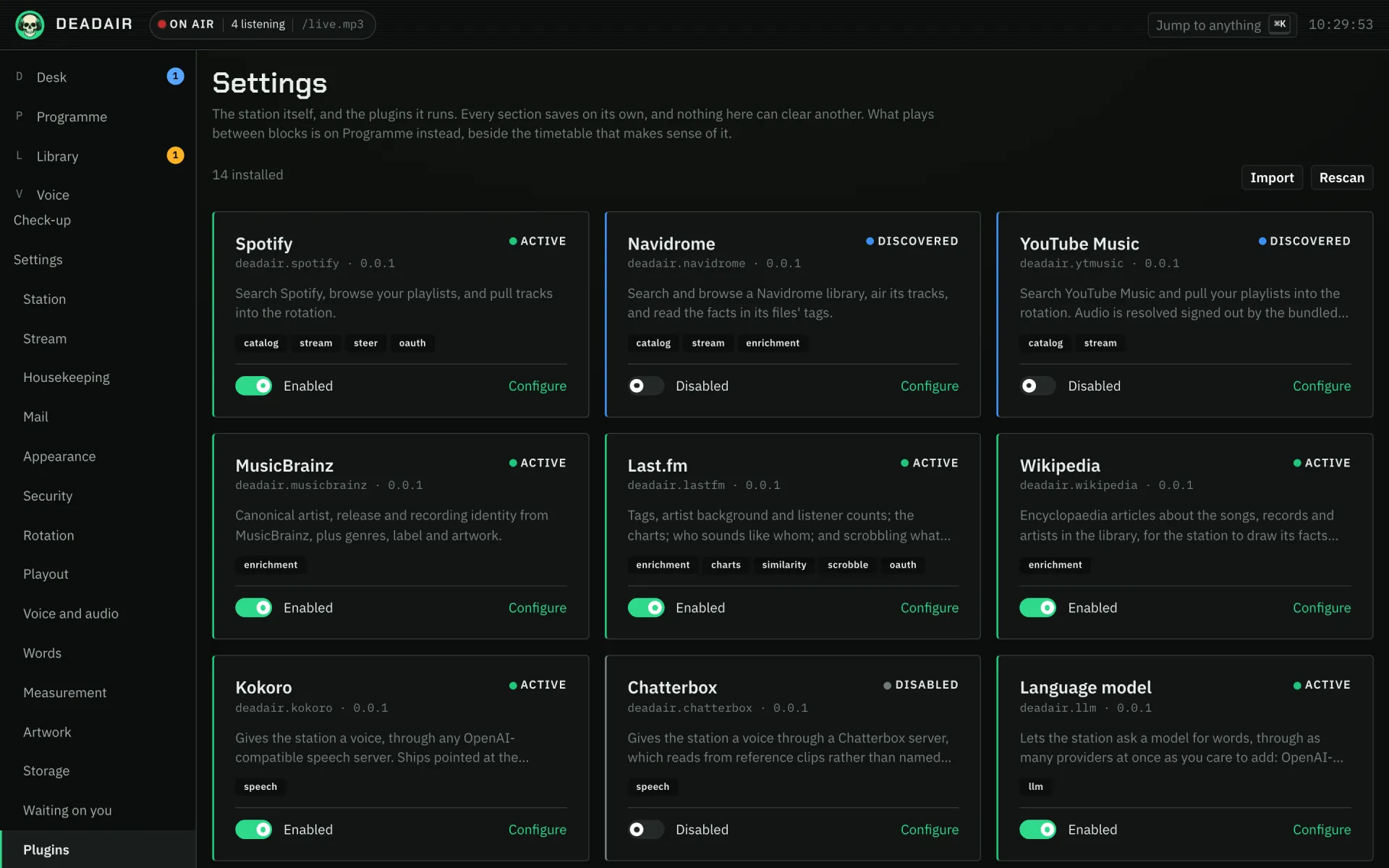 Fig. 1. The plugins.
A missing plugin degrades the station
With no model the station writes its own breaks from its phrasings. With no voice it plays records. With no analyzer every record plays, unmeasured. The one it cannot do without is a music provider: there is nothing to programme until there are records.
The bundled twenty-seven
Music
- Spotify. Search, your playlists and the audio. It needs two authorizations: see the library.
- YouTube Music. Search, your playlists and the audio, signed in with a cookie you paste. It reaches the live sets, sessions and uploads that are on no streaming service. The cookie is used for search and your library only: the audio is fetched signed out, so a record that only an account may play (age-gated or members-only) is skipped.
- Pandora. Search and your playlists with any account, and the audio with Pandora Premium. Unofficial and US only: it signs in with your email and password the way Pandora's own app does, which Pandora's terms do not contemplate. See the music licensing notes.
- Apple Music. Search with no developer key, and the audio with an Apple Music subscription. The audio is recorded in real time from Apple's own web player, signed in to your account, so it needs one of the
-appleimage tags and a one-time sign-in (see install), and a fresh station fills its cache slowly. A MusicKit key, which takes a paid Apple Developer membership, adds ISRCs and the playlists on Apple's charts; your own Apple Music library is never read. See the music licensing notes. - Navidrome, or any Subsonic server. Your own library and playlists. It also reads the facts in your files' tags, the only description that exists for a bootleg or a local band.
- Jellyfin. Your own library and playlists on a Jellyfin server, read as one Jellyfin user with an API key from its dashboard. It also passes on what Jellyfin knows about each record, from your files' tags and its own online lookups, MusicBrainz ids included.
- Emby. Your own library and playlists on an Emby server, read as one Emby user with an API key from its server settings. It also passes on what Emby knows about each record from your files' tags, MusicBrainz ids included.
- Plex. The music libraries and audio playlists on your Plex Media Server, reached directly with your Plex token. It airs the original files, and it also passes on what Plex knows about them: each record's label, styles and moods, and each artist's biography and picture.
Facts about records
- MusicBrainz and ListenBrainz. Canonical identity for artists, releases and recordings, with genres, label, cover art and artist background. A free ListenBrainz token, or your own mirror, gets past the public service's one request a second. It also answers who sounds like whom, from ListenBrainz's listening data: similar artists need no token, while naming an artist's best known records, and the records people play alongside one record, do. With a token it can also scrobble what the station plays to that ListenBrainz account, which is off by default and switched on in the plugin's settings. It is a separate destination from Last.fm, so either can be down without costing the other its plays.
- Last.fm. Community tags as genres and moods, artist background, the charts, who sounds like whom, and scrobbling, which is off by default. Its terms are non-commercial.
- Deezer. Who sounds like whom, and what to play by them. It needs no account and no API key, so it is the one similarity source that works the moment you switch it on. It sits alongside Last.fm rather than instead of it: two sources disagreeing about who resembles an artist are not in conflict, and the station keeps every name both offer.
- LRCLIB. The words of each record and the timing of each line, from an open lyrics database you can also run yourself. The station never says a lyric: it uses the timings to know when the singing starts, and a signed-in app can show the words. It asks nothing until you switch on looking up lyrics under Settings → Measurement, and its lyrics are contributed by volunteers with their rights cleared by nobody, so keeping them is your call.
- Wikipedia. Articles about the songs, records and artists in the library, in the language you choose. The station draws its facts from this prose and keeps the sentence behind each. See claims. It also answers what happened on today's date, which is what a This day break reads out, once it has been given a contact address.
The world outside
- Web search. SearXNG, self-hosted with no account, or Brave or Tavily, which need a key. Give it sites worth quoting and it reads those, and only those, for background on records.
- RSS. The feeds you point it at, for news bulletins, and optionally the story behind each headline.
- Weather. Open-Meteo, which needs no account and covers the world; the US National Weather Service, free and United States only; or OpenWeatherMap, which needs a key.
- Podcasts. The podcast feeds you subscribe to, so the station can carry somebody else's programme at a time you choose. It can look a show up in Apple's podcast directory. See podcasts.
Voice and words
- Kokoro. Any OpenAI-compatible speech server, pointed by default at the Kokoro voice the
latestandfullimages bundle. - Chatterbox. A voice read from reference clips, with the model on the graphics card managed by the plugin.
- Rhapsode. A speech server that holds several engines at once and says what each of them can do: which performance cues it can perform, which builds it can load, how much text it takes in one go. The station asks rather than assuming, and the server decides which model is on the card.
- ElevenLabs. The hosted speech service, with an API key: no graphics card, and the account's own voices offered by name. Eleven v4 performs laughs, sighs and a hushed or rushed reading. Every character spoken counts against your ElevenLabs plan.
- Language model. As many providers at once as you add: OpenAI-compatible servers, Anthropic and Gemini. See models and voices.
Chat
- Telegram. People message your station's bot and it tells them what is on air, in direct messages and in the groups you list. It can also post each record to a channel or a group as it goes to air. It needs a bot token from Telegram's @BotFather and no public address: the station asks Telegram for messages rather than waiting to be called.
- Discord. The same on a Discord server: people use the station's slash commands (or type them) in the channels you list or in a direct message, and pick from buttons when a request matches more than one record. It can post each record to a channel as it goes to air. It needs a bot token from the Discord Developer Portal with the Message Content intent turned on, and no public address: the station holds a connection open to Discord rather than waiting to be called.
- Slack. The same in a Slack workspace: the station's slash commands, direct messages to the app, buttons to pick a record, and each record posted to a channel as it goes to air. It needs an app made from the manifest in setting up Slack, with its bot token and an app-level token, and no public address: the station holds a Socket Mode connection open to Slack.
Speakers
- Speakers. Plays the station on speakers and televisions on your network: anything with Chromecast built in, a Sonos, a BluOS player (Bluesound, NAD), or a UPnP/DLNA renderer such as an AV receiver or a television. It finds them on your network by itself when the station can see its multicast, and otherwise takes a Chromecast, a Sonos or a BluOS player by the address your router gave it and any other renderer by its description address. The speaker fetches the stream itself, from the public address in the station's stream settings or from a separate address for speakers set beside it, so that address has to be one it can reach, and a speaker playing the station counts as a listener.
Measurement
- Audio analyzer. Measures each record's cue points and loudness, and joins several pieces of audio into one, so a phone-in airs as a single item.
One capability nothing bundled fills
A narration plugin hands the station text to read out whole: a chapter, an issue, a long read. The station reads it in its presenter's voice, and there is a page in the console for what it has read, but none of the twenty-seven above offers anything to read. That one waits on a plugin somebody else wrote, or one you write. See readings.
Plugins are trusted code
A plugin runs inside the station's server process with its privileges. It can read and write files, open network connections, and read the server's environment, including the database and encryption credentials. The first time you enable one, the console says so and asks you to confirm. Enable a plugin as you would add a dependency to a project: because you trust who wrote it. There is no sandbox, and none is planned.
What the station does is hold a well-behaved plugin to what it said:
- It reaches only the hosts it names, or the address you gave it in a setting. Anything else is refused, every redirect is checked again, and each service is paced at its published rate limit.
- Every call is bounded in time, and the answer in size.
- Secrets are write-only: encrypted at rest, never shown again, never returned by the API.
- A failing plugin is set aside. Three failures in a row mark it Failed, so calls stop piling up behind it. If the fault can clear, the station probes it and restores it when it answers; if not, as with a rejected key, saving its settings brings it back. What counts is the station's own calls: Test connection asks the plugin whatever state it is in, and a test that comes back unhappy never sets a working plugin aside.
That protects an honest plugin from a hostile service, and you from a careless plugin. It does not protect you from a hostile one. The permissions a plugin declares describe what it says it needs; they are not a limit on what it can do.
What a plugin asks you for
A few capabilities are too wide to allow by default, so a plugin must ask and you must answer. There is one today: the open web, meaning any public address rather than only those its manifest names or you supplied. RSS asks for it, because the stories behind the headlines are on whatever sites your feeds link to, and only the feeds know which.
Even allowed, private and loopback addresses stay refused, including behind a public name, so the open web never means your router. Each new host the plugin reaches is logged the first time.
A request shows the plugin's reason, quoted, beside what allowing it actually does, in the station's own words. The answer is Allow or Deny; an unanswered request reads as Denied, and a decision takes effect on the plugin's next request. A refused request makes a plugin look misconfigured (RSS reads headlines with no stories behind them), so it is shown at the top of that plugin's page too.
In the console
Settings → Plugins: a card per plugin with its state (Active, Disabled, Misconfigured, Failed or Discovered); Import, which takes the tarball npm pack writes and puts it in the plugins folder switched off, after you tick that you trust its code, because importing runs it (switched off only means the station does not use it yet); and Rescan, which picks up a plugin added to that folder by hand. A plugin you installed yourself is marked Installed, and one that failed to load names the folder the station read. Importing a new version of a plugin replaces the old one and takes effect at once, with its settings kept; importing the same version again, or replacing its files by hand, takes effect when the station restarts. A plugin's page holds its settings, Test connection, anything it has asked for, and its log, and for one you installed, Remove, which deletes its folder and keeps its settings. Settings → Waiting on you lists every request from every plugin, and is empty when nothing has asked, which is the ordinary state. Where several plugins could do one job, the Words, Voice and audio, and Measurement sections of Settings say which does it.
Setting up Slack
Slack will not let an app register its own slash commands, so the station's come in the app's manifest. At api.slack.com/apps, choose Create New App, then From a manifest, pick your workspace, and paste this:
display_information:
  name: Dead Air
features:
  app_home:
    messages_tab_enabled: true
    messages_tab_read_only_enabled: false
  bot_user:
    display_name: Dead Air
    always_online: true
  slash_commands:
    - command: /now
      description: What is on air right now
    - command: /request
      description: Ask for a record
      usage_hint: TITLE OR ARTIST, then for NAME: MESSAGE if you like
    - command: /help
      description: What you can ask
    - command: /link
      description: Link this account to your station account
      usage_hint: CODE
    - command: /unlink
      description: Undo /link
    - command: /skip
      description: Skip what is playing
    - command: /offair
      description: Take the station off the air
    - command: /onair
      description: Put it back on the air where it stopped
oauth_config:
  scopes:
    bot:
      - chat:write
      - commands
      - channels:history
      - groups:history
      - im:history
      - mpim:history
      - users:read
settings:
  event_subscriptions:
    bot_events:
      - message.channels
      - message.groups
      - message.im
      - message.mpim
  interactivity:
    is_enabled: true
  socket_mode_enabled: true
Rename it if you like, and drop a command you do not want: the station still answers one typed in a direct message. Then:
- Install App to your workspace, and paste the Bot User OAuth Token (
xoxb-…) into the Slack plugin's settings. - Under Basic Information, generate an App-Level Token with the
connections:writescope, and paste it (xapp-…) too. - Invite the app to each channel it should answer or announce in (
/invite @Dead Air), and list those channels' ids in the settings. A channel's id is at the bottom of its About tab.
Installing one, or writing one
A plugin is a folder holding its package.json and its built code, and npm pack turns that folder into the one file Import takes. Import it and enable it, or copy the folder into plugins/ inside the station's data volume, press Rescan, and enable it. Only install a plugin from somebody you trust: the station has to load a plugin's code to learn what it is, and it runs with the station's own privileges once it is on. Where that folder is on each kind of install, and everything about writing a plugin of your own, is in writing plugins. Plugins other people wrote are listed in the community directory, and listed there does not mean reviewed.