The library
deadair holds no catalogue of its own. It programmes the music your provider already gives you, a Spotify, YouTube Music, Pandora or Apple Music account, or a media server you run (Navidrome or another Subsonic server, Jellyfin, Emby, or Plex), and it grants you no rights to broadcast any of it: read the music licensing notes before you publish an address. What it keeps is a library: an entry for every record it has met, and what it has learned about each.
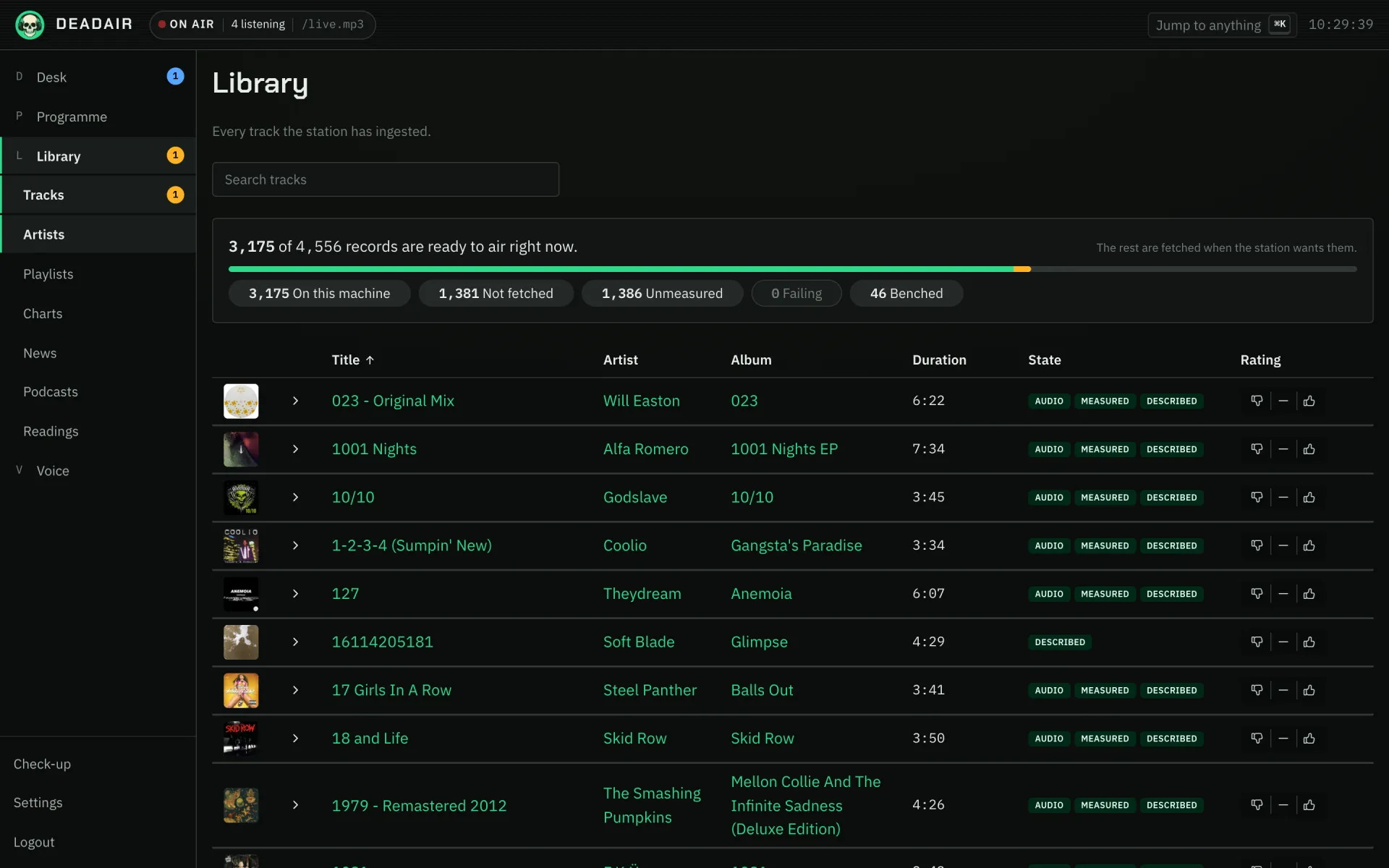 Fig. 1. The library's tracks.
Where the records come from
A music provider is a plugin. Eight are bundled: Spotify, YouTube Music, Pandora (whose audio needs Pandora Premium), Apple Music (whose audio needs a subscription and one of the -apple image tags), Navidrome or any other server that speaks the Subsonic API, Jellyfin, Emby, and Plex. The library fills from their playlists, because a playlist is the only list of records a provider will hand over, and the station walks them whenever a provider's settings are saved and again every hour. Refresh now on the Playlists page walks them at once, and Refresh this playlist in a card's menu reads just that one; the activity feed says when either is done. Under Settings, Housekeeping, you can make the automatic walk rarer or turn it off, which is worth doing on an account where reading every playlist is slow. A record taken out of a playlist is only retired by a walk of everything, never by refreshing one playlist. A Navidrome, Jellyfin, Emby or Plex library with no playlists is still a complete setup: the plugin offers one extra playlist, Everything, which is the whole library (on Plex, one for each music library).
When a model chooses a record no playlist carries, the station looks it up at your providers, and a strict match on title and lead artist becomes a real entry, marked "found". A near match is refused: it would air the wrong record under the right name.
Spotify needs two authorizations, and you need both. The connection lets the plugin read your library. The playback authorization, on the card below it, lets the station fetch the audio. With only the first, your playlists list perfectly and every record is dropped for want of audio. The card walks you through the second.
YouTube Music signs in with a cookie you paste, and plays signed out. There is no sign-in button to offer: Google withdrew that for this service, so the plugin's page asks for the Cookie header from a browser signed in to music.youtube.com, and says where to copy it from. It has no refresh and expires on the account's own schedule. When it does, the plugin's card says so rather than your library quietly thinning, because search goes on working signed out. If the browser is signed in to more than one Google account, Google account picks which one the playlists come from, and Test connection names the account it reached.
The cookie is for search and your library only. The audio is found by a small program bundled beside the station, which turns each record into an address the station downloads from itself, and it asks without your cookie, because YouTube currently serves a signed-in request nothing the station can download, Music Premium included. So a record that only an account may play, age-gated or members-only, is skipped rather than aired. The plugin ships switched off: read the music licensing notes on what fetching this way means before you switch it on.
Jellyfin reads the library as one of its users. It asks for an API key, made under API Keys in Jellyfin's dashboard, and a user name, because Jellyfin will not list a playlist's contents to a key alone. That user's library access is what the station sees, so a user given only the music library keeps a film library's soundtracks out. The station airs the original file unless you ask the plugin for MP3 or Opus. Jellyfin also passes on what it knows about each record: the genres, years and MusicBrainz ids in your files' tags, and the biographies and pictures its own online lookups found. Those sit behind MusicBrainz too.
Emby works like Jellyfin, with an API key and a user. The key is made in Emby's server settings, under Advanced, then API Keys. Emby cannot list audio playlists apart from video ones, so every playlist the user can see appears, and a video playlist simply brings no records. The station airs the original file unless you ask the plugin for MP3 or Opus. Like Jellyfin, it also passes on the genres, years and MusicBrainz ids in your files' tags, behind MusicBrainz.
Plex is reached directly, with your Plex token. Give it the address of the server itself, port included, rather than app.plex.tv. The token is your account's, and the plugin's page says where to find it. Your audio playlists come across, smart ones included, and the station always airs the original file. Plex also passes on what its own metadata agents know: each record's label and styles, each track's moods, each artist's biography and picture. Those sit behind MusicBrainz, filling its gaps rather than overruling it.
Apple Music is searchable with no key, and lists no playlists without one. With only a storefront set, the plugin searches Apple's public catalogue, so a model or a listener request can find records there, but it hands over no playlists and the library does not fill from it. A MusicKit key, which takes a paid Apple Developer membership, adds the playlists on Apple's charts and the ISRC that matches a record to the same recording at your other providers. Your own Apple Music library and playlists are never read: Apple offers no way in for a server. The audio is recorded in real time by a player that runs Apple's web player in Google Chrome, which is why it needs one of the -apple image tags and a one-time sign-in, described in install. A four-minute record takes four minutes to arrive, and each is recorded once and kept. The plugin ships switched off: read the music licensing notes before you switch it on.
What it records about each record
A record's page shows its title, artist, album, year and duration, and then:
- Copies: each provider's copy, whether it is on this machine, its format and size. A clean edit and the explicit original are one record with two copies, and the explicit label rides on the copy.
- Measurement: its cue points and loudness, when they were taken and by what.
- Airings: when it has played.
- What the sources say: genres, moods, label, and facts drawn from articles, each with the sentence that supports it. See claims.
- Your rating: liked, neutral or disliked, which can also be set on the artist and the album. A dislike anywhere wins outright. See the programme.
- Suspend, beside the rating on a record's, a release's or an artist's page: keep it off the station for a day, for a week or for a month without disliking it. Nothing already in the running order is taken out, but it is not chosen, searched up, requested or routed through until the suspension lapses, and a suspended artist is kept off records they only guest on too. Your rating stays as it was. The page says how long is left, with Lift to end it early, and the tracks list has a Suspended filter.
The tracks list filters by state: On this machine, Not fetched, Unmeasured, Failing and Benched. A zero under the last two is the answer you want.
Once anything has been measured, a second line filters by the measurement itself. Measured by lists each analyzer that has measured records here, or tried to, with how many. Choose one to see every record it touched, which is where to start when a detector has been wrong about a kind of record. Beside it, failed measurements are counted by kind: could not fetch and stopped early are tried again within the hour, and would not decode after a day, since retrying sooner reads the same file. A record's page says which kind its failure was. With either chosen, Measure these again throws away the measurement of every record on the page, so the walk measures them again on its next pass. It leaves their audio alone, and until then they play unmeasured.
Measuring each record
Records rarely start and stop where the file does. A measurement program beside the station decodes each record and answers with four points (where the sound starts, where the intro ends, where the ending begins, where the sound stops) and its loudness to the EBU R128 standard. With them the station trims the silence at head and tail, knows how long a presenter may talk over an intro, sizes each blend from what both records do, and sets every record to one target loudness, so a quiet 1970s pressing and a loud modern master arrive level.
It is a separate program because the station's own server decodes no audio, and it is reached over HTTP, so moving it to a bigger machine is one address in the analyzer plugin's settings. A download that arrived cut short is reported as incomplete rather than measured, because a truncated file measures confidently and wrongly.
An unmeasured record still plays, untrimmed, left to the stream's live leveller. And one rule about blends has no exception: a record is never faded into speech.
Nothing airs until its audio is here
A record is committed to the running order only once its audio is on this machine. Fetching from a provider at the moment the player needed the record once put two seconds of silence on air, so the station fetches several records ahead. A record whose audio has not arrived is held rather than skipped, so your sequence is never reordered by whichever download finished first. A copy that fails four times in a row is benched, a record with no copy left comes out of the order before its slot, and the next walk of the library gives a benched copy another chance if the provider still lists it. See the running order.
Every record fetched is kept, so a second airing costs no download. "Keep at most" under Settings → Playout caps the space; the least recently played go first, and never one about to air.
Records, cover art and the audio of everything the station has said are each stored as a file with a row in the database pointing at it. A crash between writing the one and the other can leave a file nothing points at, which nothing can reach again. Settings → Storage counts them, and Delete media files nothing points at under Settings → Housekeeping (off by default) removes them in a nightly sweep. A file is left alone until it has sat unclaimed for a day (an hour at the least), because a file being written this moment has no row yet either; a file two rows share is kept while either wants it. The activity feed notes each sweep that removes anything, under Storage.
Playlists and charts
Three ways to put a whole list on air:
- An album: open it in the Library and press Air this album. The whole album plays in the order it was made, by disc and then by track, with no breaks or blends between its records, and the station stops at its end (or when the schedule's next block starts). The order comes from the track numbers your music source reports; a record it never numbered plays after the rest. Records the station will not play (a dislike, the explicit-content policy) are left out, and the rest play in order.
- A playlist: open it under Library → Playlists and press Air this playlist. The running order is rebuilt from it, in its order, and your dislikes and explicit-content policy still apply. A playlist none of whose records are in the library yet is refused, and the refusal says why: the library takes a playlist in when its provider is walked, so one added since the last walk needs Refresh now first. Aired anyway, it once put the station on air with nothing but the bed. The arrow beside the button offers Air with similar records mixed in, the way a smart shuffle does: every few records, a record by an artist who sounds like the one just played. The playlist still plays in full and in its own order around them. It needs a similarity plugin (Deezer needs no account; Last.fm needs a key), and Play records the station does not own yet on. With more than one enabled, Which similarity source to ask first under Settings, Rotation says whose suggestions the station reaches for before the others. To have every playlist do it, turn on Mix similar records into a playlist under Settings, Rotation, which also sets how many of the playlist's records play between mixed-in ones. A setlist never has anything mixed in.
- A chart, from a plugin that publishes one, such as Last.fm. Airing it puts the station on those records for a broadcast; when they run out it programmes itself again. Each entry goes through the same lookup and rules as any other pick.
Either can also be what the station plays when nothing is scheduled. See the programme.
The station's own playlists
A playlist from a provider is read live every time it airs, and it changes whenever its owner changes it. The station can also keep playlists of its own. They are listed first under Library → Playlists, and Import there makes one from any of these:
- A file: a playlist another deadair station exported, an M3U from a media player, or a CSV from a playlist exporter such as Exportify. A CSV's columns are found by name, so their order does not matter.
- A pasted list, one
Artist - Titleper line. Numbered lines are fine. - A link to a Spotify, YouTube Music, Pandora, Apple Music, Navidrome, Jellyfin, Emby or Plex playlist, including one your account does not list, such as a playlist a friend shared. An Apple Music playlist is read in the storefront the plugin is set to, and only with a MusicKit key in its settings: without one, the import says a key is needed.
Save as a station playlist on any provider playlist's page makes one the same way. Every import is previewed first: which records the library already holds, which it will look up, and any line that named no record. Nothing is written until you press Import. Importing the same thing twice makes two playlists, and neither is tied to where it came from.
A record the library does not hold keeps its place in the order, drawn dimmed on the playlist's page, and the station looks it up at your music sources straight after the import. It asks the source the record was copied from first, when that source is connected, and otherwise searches every source on the same strict title-and-artist match it uses for any record it finds for itself. Records it finds join the library marked "found", and the activity feed says how many were found. Look up missing records on the playlist's page tries again. Records that are still missing fill in by themselves as the library grows. Nothing is looked up while Play records the station does not own yet is off.
Air this playlist works as it does for a provider's playlist, similar records included, and each record plays from whichever source has a copy. A block on the timetable can play one too: they are listed first under Playing from in the block's editor. Because a station playlist is read from the library rather than from a provider, it is the one to choose for a long pool of records, which a provider can be too slow to hand over when the block starts. Records the library does not hold yet are left out. Export saves a playlist as a file another station can import: records are named by title, artist and ISRC, never by this station's own ids, so they match up on the other side.
In the console
Library in the rail, or the L key: Tracks, Artists, Playlists, Charts, News, Podcasts and Readings. A record's page opens from any list, or from its name typed into Jump to anything. A provider's connection, Spotify's playback authorization and YouTube Music's cookie are on its page under Settings → Plugins. Measurement has its own section in Settings.