The check-up
A radio station that goes quiet has to be able to say why. deadair answers with one verdict, worked out from every gate that can silence it, checked in the order the signal flows. Each change of verdict is written to the station's own log, so the question still has an answer the next morning.
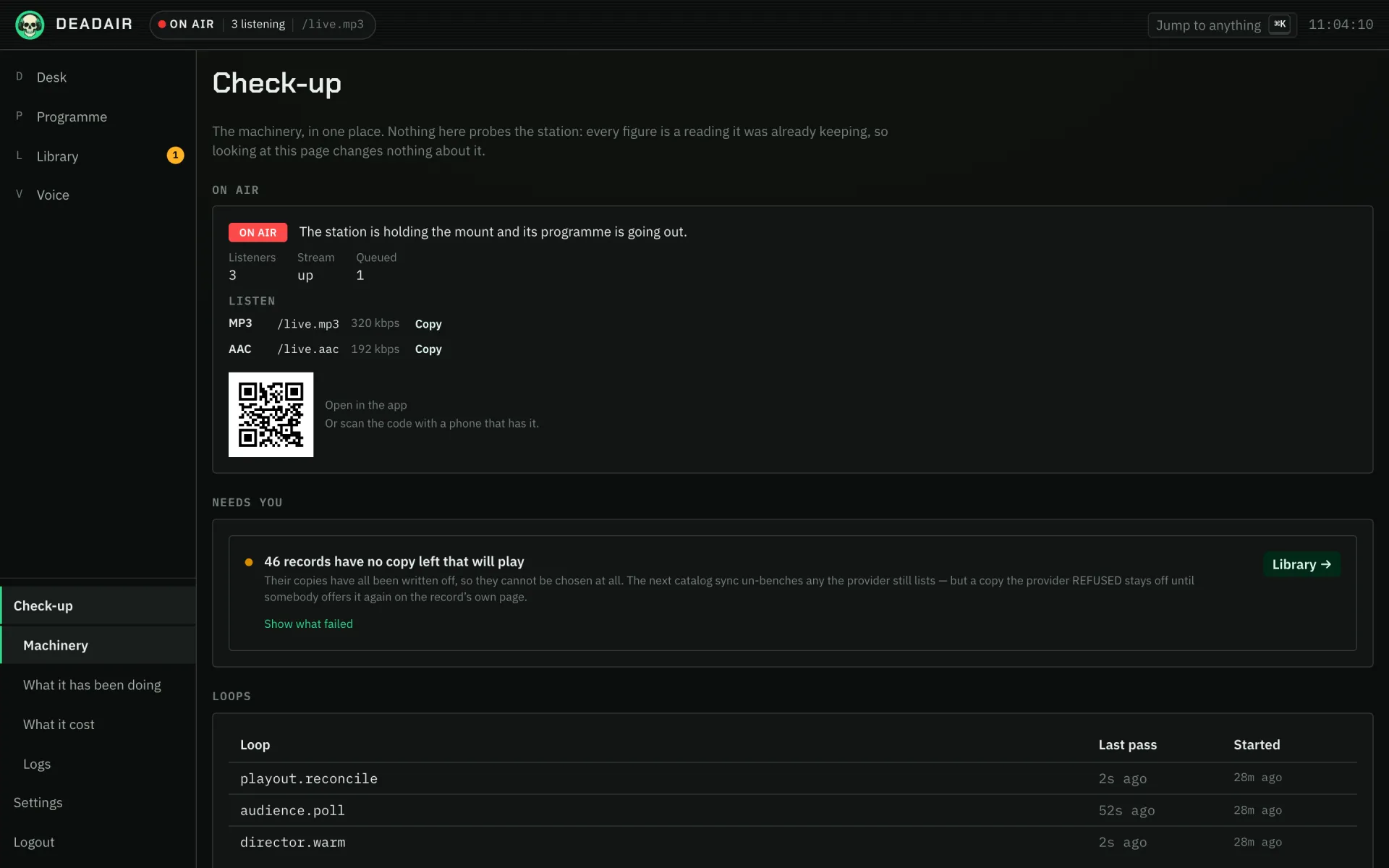 Fig. 1. The check-up's Machinery tab.
Quiet on purpose
Two properties make silence an ordinary state rather than a fault.
The mount is leased, not held. The audio chain airs nothing unless the station keeps renewing a claim that lasts a few seconds. A station that crashes or is redeployed therefore takes itself off air within seconds, rather than leaving a music bed playing to nobody's plan. Stop means out of service, not "fall back to something".
By default it airs only while somebody is listening. A station with a full running order and no listeners is silent deliberately: producing audio costs a fetch and a download per record, and an empty mount is the one case where nobody benefits. The console calls this state ready, not a fault. When the last listener leaves, the station stays on air for five minutes in case they come back. You can set it to air whenever there is a running order instead.
The console does not play the station, so having it open does not count as listening.
Who counts as listening
The audience is the sum of every mount, as the stream server counts them, plus anybody listening over HLS. An HLS listener holds no connection open, so the station counts one for every player that has re-fetched its playlist in the last fifteen seconds, told apart by address and by the player's user agent.
Two consequences follow:
- Behind a reverse proxy or a tunnel, every listener arrives from the proxy's address unless the container is told which proxy to trust, through
REAL_IP_FROM("Proxy in front" on Unraid). Without it the count can be wrong in both directions. - A program that fetches the stream around the clock keeps an audience-gated station on air for nobody. Players the station will not serve takes a list of user-agent names, such as
Go-http-client, and refuses them without counting them.
Only a positive reading moves the gate. A failed reading is not an empty room, so a stream server that stops answering while somebody is listening does not take the station off air.
Why it is quiet
The verdict comes from eleven gates, judged in order. Is the station's own playout loop running? Will the audio chain accept its commands, and can it be reached at all? Is it running the configuration the station last wrote? Has somebody stood the station down? Is there anything to air? Is anybody listening? Is it still downloading its first records, or have the downloads stalled? Is the station holding the mount? Is the mount playing the running order, or a local bed?
The first gate that blocks is the answer, because a gate upstream makes everything below it unreadable rather than merely also wrong. A stalled loop outranks an unreachable stream because the loop is what checks the stream.
Each gate is in one of three states: fine, waiting or at fault. Waiting is not a mild fault. A station idling for want of a listener and a station that cannot reach its stream are both silent, and only one of them wants fixing. Every verdict carries a sentence saying what is happening and, where there is something you can do, the remedy. When the remedy is restarting a container the station cannot restart itself, the command comes with a copy button.
One gate is reported and never given as the cause: "config not adopted", meaning the audio chain is running settings the station has since replaced. A station can air perfectly well while that is true, but it is the reason your next attempt to go on air will fail.
What happened
Every change of cause is written to the station's event log when it happens. The activity feed reads that log alongside what aired and each break's journey from being written to being heard. It records the station going on and off air, a record skipped, a copy benched after failed fetches, a refill that came back short, and a break the model declined that the station's own words covered for.
A line is written when something changes, not every time the station looks, so the feed is a list of moments rather than a log file. When the station has to pass over a run of items at once, after a dropped stream for example, it writes one line with the count. Every line is the station's own sentence; nothing a provider or a plugin said is quoted.
In the console
Check-up is at the foot of the navigation, and has seven tabs. Machinery shows the verdict with its sentence and remedy, the listener count, whether the stream is up, what is queued and which mounts are published, then Needs you, the loops, the plugins, how many records are held, local and measured, the disk and the build. Trends is how the station's numbers have moved over time. What it has been doing is the activity feed, filterable by part and severity. As run is what actually went out: every record, break and programme with when it started and how long it ran, and between them any stretch the station aired its local bed or was off air. Read back from jumps to a moment. An item with no length other than the one on air now is one the station never saw end, which means it stopped without being stood down. The log is kept for 400 days; the bed and off-air lines in it only as long as the activity feed. What it cost is every call the station made and what it spent. Logs is the station's own log and the audio chain's. What's new is what changed in each release. Under the mounts there is a deadair:// link and a code to scan, either of which hands a listener app this station's address without anybody typing it. On the Desk, Why is it not on air? opens every gate with the switch for what puts the station on air. The same switch, and the list of refused players, are under Settings, Playout and Settings, Stream.
Which release, and what is new
What's new lists every release the station contains, newest first, with what changed in each, and marks the one it is running. The notes are the station's own changelog, built into it, so the page works on a station with no internet connection. The Build section of Machinery links to it.
The station also checks whether a newer release is out. When one is, the console's header names it, What's new lists it first with its notes and a link to its page, and the Build section says so. The station asks GitHub for the project's public list of releases once when it starts and then every six hours, one anonymous request each time. Check now, on What's new, asks straight away, for an operator who has just heard a release went out; a second press within a minute gets the same answer rather than a second request. It sends nothing about the station: no name, no version and nothing about who is listening. GitHub sees the request arrive from your network's address, as it would any visit. The station never installs anything itself; upgrading is still pulling the new image, as you installed it.
A station following latest is compared by the newest release it contains rather than by a version number, which only a release build carries. So it is told about a release only once one is out that it has not already picked up from main.
To stop the check, turn off Settings, Station, Check for new releases. Off, it sends nothing at all, and the notice disappears as soon as you save.