Breaks
A break is anything the station says between records: a link, a welcome for somebody just tuned in, a news bulletin, the weather, something that happened on today's date, a presenter's story. Every kind has more than one writer, and the last in line cannot fail. A slow or missing model costs the station a better sentence. It never costs it the break.
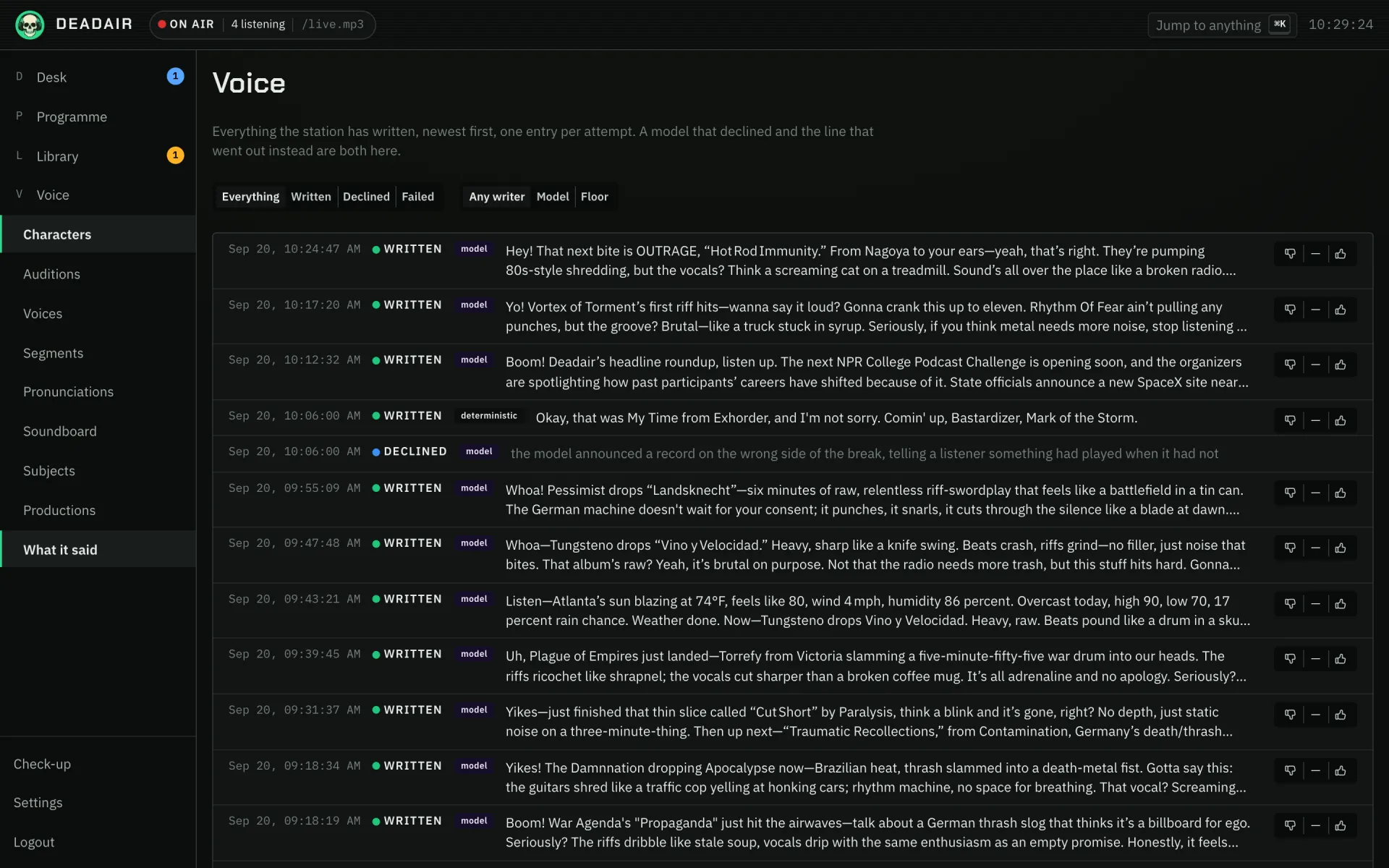 Fig. 1. What it said.
Two writers, and a floor
Each kind of break has a model writer in front and the station's own phrasings behind it. If the model declines, answers with nothing, fails or takes too long, the phrasings write the break. That floor needs no model and no network, so it cannot fail.
The model writer is off on a fresh install. Until you turn on "Let a model write the talk breaks" under Settings, Words, every break comes from the phrasings, instantly. The same switch covers welcomes, bulletins, weather, stories and the line marking a change of show. Connecting a model is covered in Models and voices.
With the model on, "Who is asked first" (Settings, Words) can turn the pair round. Asking the phrasings first airs your own words, the headlines as published and your stories as written, and asks the model only where those have nothing to say. Every kind of break follows it. A block on the schedule, or a show started from Desk → Plan, can choose otherwise under Who writes the breaks first, and leaving it on The station's setting follows this one.
The phrasings are the character's: "Their own phrasings" on each one under Voice, Characters, one per line, with placeholders such as {{next.artist}} and optional parts in [[double brackets]]. Empty the box and the station's own come back; to stop it talking, turn off "Let the station interrupt itself". See Characters, and writing phrasings for every placeholder. The words around everything else it says (a welcome, a jingle, a change of show, the news, the weather and the date) belong to the station rather than to a character, and are under Voice, Phrasings, in the same syntax.
There is one model slot, and a break has priority on it over background work. A break that waits too long for it gives up and lets the floor write. Breaks are written as their slot nears, up to eight items ahead, and a station off the air writes nothing.
What the model is asked for
The ceiling is forty words, about fifteen seconds, and it is a ceiling rather than a target: the median break on this station runs to twenty-eight. A talk break names a record, says what the presenter makes of it, and makes one point. The notes the station holds about each record are offered, never required.
A failed check sends the break to the floor rather than back for another draft:
- A talk break naming neither record it was shown is declined: it sounded like the character, and nobody knew what was playing.
- About the station and What is going on at the station, under Settings, Station, are told to every presenter as background: who the station is, and anything true right now (an anniversary, a fundraiser, a move). The second is offered as something to know rather than to say, so it comes up where it fits instead of in every link. Clear it when it stops being true.
- The model is told which part of the day it is, and "tonight" at nine in the morning is declined. This rests on "Station timezone" under Settings, Station; left empty, it is the container's clock, often UTC.
- When the station knows nothing about a record beyond its listing, the model is told so, and told to state no dates, labels or pressings. Before that rule the station invented catalogue numbers.
- A script that runs long is cut at the last whole sentence that fits.
A model can be given tools to search the library, the news and the web, though not while writing a break: no tool answer reaches air in one.
Bulletins
"The feeds a bulletin reads" under Settings, Bulletins is an ordered list. Empty, every feed is read. Filled in, only those feeds are, one story from each in turn, so a publisher posting twenty times a day cannot crowd out one posting three times.
A bulletin never repeats a story while it is fresh (twelve hours by default), and when everything fresh has been read it is skipped. It is not shown notes about the next record, because a bulletin finishing a note it half understood is how this station once aired false discography. It reports in its own words and keeps the facts, never reads a headline and then restates it, and stops when the stories stop. The floor under it reads the headlines as published. A bulletin read by a character says who is reading it, and the reader may close on their own sign-off, one line before handing back; a fixed sign-off belongs in the character's quirks rather than its samples, because a script that repeats a sample is refused as a quotation.
News categories under Voice, Subjects let a band on the format clock ask for a subject; a bulletin whose category matches nothing is skipped rather than aired under the wrong name. A category marked off air is withheld everywhere, which is how a publisher's deals desk stays out of your news.
The weather
Where the station is, and its units, are under Settings, Station. A weather break states only figures a service measured: no comparison with yesterday, no advice about coats. A model naming a temperature it was not given is declined, and a reading that will be older than "How old a reading may be (minutes)" (two hours by default) when it airs is not used.
A presenter can also mention the weather on an ordinary link, which is a separate switch: "Let the presenter mention the weather between records" under Settings, Bulletins, off by default. The reading is offered rather than asked for, so most links ignore it and the ones that do not say something like "it's sunny, get out there while it lasts" instead of reading a forecast out. It needs a weather plugin, a model writing the breaks and Where the station is set; the station's own phrasings underneath the model never mention it, and what the presenter is handed is the station's own place, never a location a band on the format clock was pointed at. Figures are held to what the service measured either way: a temperature the station never gave the model is declined here too.
This day in history
A band on the format clock set to This day reads out something that happened on today's date. The entries come from whichever plugin can answer — the bundled Wikipedia one does, once it has a contact address — and the station reads them as they were published: the break frames a line with the year and whether it is a birth, a death, an event or a day that comes round every year, and adds nothing else.
A day is mostly general history, so "What the station picks out of the day" under Settings, Bulletins decides what a music station does with it. The default puts the musicians first and keeps the rest behind them; "Music only" is stricter and will skip the slot on a thin day. Nothing is read out twice in the same day, and the date is the one the break AIRS on, in your station's own timezone, so a break written at ten to midnight is about tomorrow. A model naming a year it was not given is declined, exactly as one naming a temperature it was not given is.
A presenter can also mention the date on an ordinary link, which is a separate switch: "Let the presenter mention the date between records" under Settings, Bulletins, off by default. The day is offered rather than asked for, so most links ignore it and the ones that do not mention an anniversary in passing. Anything said that way is spent, so a band set to This day has one fewer entry to use.
Jingles
A jingle is a few seconds of the station saying its own name between two records. Set "Minutes between jingles" under Settings, Breaks to how often you want one; zero, the default, is off. A jingle never lands next to a break, and a break always gets first choice of the gap between two records.
If you have jingles recorded, drop them in the segment inbox's jingle folder, or upload them on the Segments page with the kind jingle, and the station plays those, never the same one twice running. With none recorded, it says one of its own lines, from "What the station says in a jingle" under Voice, Phrasings, and ends it on a sound from the presenter's soundboard if they have one. Those lines only ever say the station's name and the presenter's, never a record or the time of day, because a jingle is placed well before it airs. For a jingle at one rate in the morning and another at night, add a jingle rule to the format clock instead.
A listener who tunes in just before a jingle hears it as their welcome, and the station does not greet them a second time on top of it.
When the show changes
When the timetable moves from one block to the next, the station says so between the last record of the old show and the first of the new one. Whoever presents the new show says it, thanks the last host by name when that was somebody else, and names the show starting. When a block ends and nothing is scheduled after it, the station names the show that ended and carries on with its sustaining source. It is on by default under "Say so when the show changes" in Settings, Breaks, and it follows "Let the station interrupt itself": a block opening a setlist or a feature marks no change, since those take no breaks, unless the setlist has Host talks between records ticked, in which case it is marked like any other show.
On a guest host's night the guest presents the new show and knows whose show it usually is, so they say they are sitting in, and every break they write that night knows it too. On a show with co-hosts, each talk break is said by whichever presenter was heard from least recently and names who else is on; the changeover and the welcome stay with the lead host.
Only a change the timetable makes is marked. Putting something on air yourself stays silent. The lines come from "What the station says when the show changes" under Voice, Phrasings, where {{show.name}} is the show starting, {{outgoing.show}} the one ending and {{outgoing.name}} its host. The station picks a line thanking the last host if one fits, then one naming the new show, then one naming the old. If the change lands in the last seconds of a record there is not always time to speak one, and the new show simply starts.
What a break looks like
A break is the station talking, so the stream's one line of text carries your station's name rather than the producer's label for it. What changes is the picture beside it: a weather forecast and a news bulletin each have one of their own, which a listener's app draws beside the title and a hardware player draws in its artwork slot. Every other kind of break shows your station's logo, as the bed and off air do.
Both pictures can be replaced with your own under Settings, Artwork, and put back again. See what a player shows.
The record of what was written
Every attempt to write a break is kept: the words or why there were none, the writer, the model, the character, the records either side. A model that declined and the floor that covered for it are two rows, because the second alone reads as a station that never had a model. Rows are kept for ninety days by default (Settings, Voice and audio). The prompt and the raw answer are kept only while "Keep the prompt and the raw answer" is on under Settings, Words, which is meant for an evening of tuning.
Asking for one now
The format clock decides when the station talks, but an operator can ask it to say something now: the news, the weather or a word from the host. Say something does it from the listener apps signed in as the operator (in the Up next menu on Android, under Manage on the iPhone, and beside Take a call on the desktop app's desk), and so can Claude or anything else with an API key (POST /api/director/air/breaks). A request from the apps goes between the record on air and the one after, once it has been written and spoken. Through the API it can also ask for This day in history, a story or a jingle, for a news category or a place by its key, and for how soon: at the first moment there is time to write it, after this record, within a few records, or at the next ordinary slot.
The station may decline, and says why rather than failing: breaks are off, the station has been asked to keep quiet for a while, there is no voice, nothing on the station writes that kind, the same request was taken a moment ago (a double press asks once), or the running order has no room. Accepted is not the same as aired: a bulletin with no story left unread is still passed over when it is written, as one the clock asked for would be.
Over the start or the end of a record
Two settings under Settings, Breaks let a link be said over a record instead of in the gap, and both are off on a fresh install. Both need the records' timed lyrics (switched on under Measurement), since that is how the station knows where the singing is, and a record without them has its link in the gap as before. A link is never cut short to fit: one that does not fit simply airs in the gap.
- Talk up to the post: a link short enough to finish before the singing starts on the next record is said over that record's intro, the last word landing just before the first sung one.
- Talk over the end of a record: a link short enough to fit between the last sung word of the record before it and that record's end is said over its outro, finishing as the record finishes. The next record then starts straight after, with no crossfade. Where the record ends comes from its measurement. A link that says the time is not moved this way, and one that would fit over the next record's intro is talked up there when that is on.
Room left around the singing is how far from the singing either one keeps.
Writing one again
A break nothing could write is not tried again on its own, because the usual reason is that nothing true could be said about the records either side. After you change the phrasings or switch the model on, the pencil on the break's row on the Desk (Write it again) throws its words away and has it written afresh as its slot comes near, under whoever is presenting by then. It works on any break the station wrote that has not reached the player yet, finished ones included, but not on a recording, somebody else's programme, or one turn of a phone-in or other production. A break whose records have already aired cannot be written again, since there is nowhere true for it to go. Through the API it is POST /api/director/air/items/{itemId}/rewrite.
Keeping it quiet for a while
On the Desk, under what is on air, Keep it from talking for stops the station's own breaks for the next 3 records, the next 10, or the rest of the order. The breaks already planned across them come out at once, and none are planned inside the quiet: no talk breaks, bulletins, jingles or greetings, and a break somebody asks for is refused with the reason. A programme on the schedule, somebody else's show, still airs. The count goes down as each record starts, so a station nobody is listening to does not use it up, and the line reads "Quiet for the next 8 records" until it ends by itself. Talk again ends it early. It survives a refill, a new show and a restart, and leaves Settings, Rotation alone; switching breaks off there is for good, and it also takes out the breaks already planned. Through the API it is PUT and DELETE /api/director/air/quiet.
In the console
Voice, What it said lists every attempt, newest first, filtered by outcome (written, declined, failed) and by writer (model or floor). Open a row for the detail; a break in the running order links to its own attempts. The format clock is under Programme, Today.